Skip to content

Fortune Favors the Prepared

Semper Paratus, Semper Gumby

Menu
  • The Continuity Chronicles
  • Daily Threat Reports
        • DAILY THREAT REPORT
        • DAILY THREAT REPORT – LITE
        • DAILY PREPAREDNESS BRIEF
        • Analytical Standards and Tradecraft
        • Acronym & Abbreviations Glossary
        • DTR Source Registry
        • COMMS WATCH
        • FLASH & SPECIAL REPORTS
        • Area-Specific Assessment Report
        • SOFT TARGET SECURITY BRIEF
        • THE HOUSEHOLD BRIEF
        • FINANCE SECTOR
        • HEALTHCARE SECTOR
        • TRANSPORTATION & LOGISTICS SECTOR
        • Strategic Intelligence Supplement
        • AI, DATA CENTER & INFRASTRUCTURE REPORT
        • CONSTRUCTION & MANUFACTURING SECTOR
  • WATCH DESK
  • About
        • The Why
        • Vision and Mission
        • Services
          • Business Resiliency
        • Testimonials
        • Insider
        • Friends
          • Patriot Volunteer Examiner (VE) Team
          • Angery American
          • Signal Stuff
          • Forward Observer
  • Communications
        • Stump Knocker
          • SOI
          • STUMP KNOCKER DMR UPDATES
          • MMDVM Hotspot
        • Preparedness Communications
          • What Radio Should I Get for Preparedness?
            • What Radio to Buy?
              • What Radio to Buy? – video
              • Ham Radio on a Budget
              • Live – What Radio to Buy?
              • Portable Radio Kit
              • Mobile Communications
          • Emergency Communications Principles
          • Communications Options
          • Starter Radio Paths by Preparedness Scenario
          • How Communications Fail
          • HF Communications
            • SHTF HF Communications
            • Simple Antenna Builds for HF – video
            • NVIS in Amateur Radio
        • Amateur (HAM) Radio
          • Why Do I Need a Ham License?
            • How to Obtain Your Amateur Radio License
              • Amateur Radio Learning Resources
              • Finding a Ham Exam
                • HAM Exam Accommodation
              • Getting Into Ham Radio – Video
            • Are You Expired?
            • Why You Should Upgrade to a General Ham License
          • HAM Simplex Frequency Card
          • Analog versus Digital
          • Analog vs Digital Voice: A Preparedness-Focused Comparison
          • CTCSS and DCS
          • Programming Radios with Software
          • ARES, RACES, ACS and AUXCOMM
          • Ham Radio Beyond Line-of-Sight
            • Linked Analog Repeaters
            • EchoLink and IRLP
            • AllStarLink
            • Yaesu System Fusion & WIRES-X
            • D-STAR
            • Digital Mobile Radio (DMR)
            • P25 in Amateur Radio
            • NXDN in Amateur Radio
            • Amateur Radio Satellites (AMSAT)
            • The 60-Meter Band (5 MHz)
          • Meshtastic
          • HAM VoIP
        • Personal Radio Services
          • FCC Rules for Personal Radio Services
          • Family Radio Service (FRS)
          • General Mobile Radio Service (GMRS)
            • GMRS Repeaters
            • Getting a GMRS License
            • FRS / GMRS / MURS Frequency Card
          • Multi-Use Radio Service (MURS)
          • Citizen Band (CB) Radio
            • CB Frequency Card
        • Other Radio Services
          • Communications Continuity Programs and Capabilities
          • Marine Communications
        • Cell Sites and Their Services
          • When Cell Service Fails
          • Radio over LTE and Rapid Radios
            • LTE Radio Comparison
        • Satellite Communications
          • America’s Secret Eyes
          • The Commercial Eye
          • Seeing Through Everything (SAR)
            • Remote Area Emergency Communication Devices
            • Which Beacon Should You Carry?
          • Personal Satellite Communications
        • Wired Communications
          • MAG Phone System
          • TA-312/PT Field Telephone and SB-22/PT Switchboard
          • Understanding Telephone Wiring
          • The AT&T Long Lines Program
        • Communications Planning
          • Communications Plan Annex
            • Communications P.A.C.E.
            • Finding Information for Your Communications Plan
            • Area-Specific Assessment Report
          • Automatic Link Establishment (ALE)
          • Understanding Communications Resiliency
        • Communications Resiliency Programs
          • ARES, RACES and ACS
          • Auxiliary Communications (AUXCOMM)
          • Military Auxiliary Radio System (MARS)
          • U.S. Coast Guard Auxiliary Communications
          • Civil Air Patrol Communications
          • The 60-Meter Band (5 MHz)
            • Understanding the 60-Meter Band
        • Government Communications Continuity Programs
          • Government Emergency Telecommunications Service (GETS) and Wireless Priority Service (WPS)
          • National Warning System (NAWAS)
          • National Interoperable Frequencies
          • The FEMA National Net (FNARS)
          • National Emergency Communications Network (NECN)
          • The SHARES Program
          • State Emergency Capability Using Radio Effectively (Operation SECURE)
          • The High Frequency Global Communications System (HFGCS)
          • Satellite Mutual Aid Radio Talkgroup (SMART)
          • The AT&T Long Lines Program
        • Communications & Emissions Discipline
          • Communications Security (COMSEC)
            • Book Cipher
            • One Time Pads (OTP)
              • Decrypting One Time Pad Message
              • One Time Pads (OTP) Live Video
              • One Time Pad Training
          • Cryptographic Security (CRYPTOSEC)
          • Transmission Security (TRANSEC)
          • Communications Transmission Discipline (TRANSDISC)
          • Emissions Control (EMCON)
          • Communications & Emissions Training Framework
        • DMR Programming
          • DMR Programming – Talk Groups
          • DMR Programming - Roaming
          • MMDVM and Yaesu System Fusion (YSF)
          • Encryption in DMR Radios
        • Digital Mobile Radio (DMR) Networks
          • WR3IRS Interstate DMR Network
            • South Central PA (SC PA)
            • North East PA (NE PA)
            • Washington-Baltimore (W-B)
            • West Central Florida (WCF)
          • Florida Digital Amateur Radio Network (F-DARN)
          • Southeast Florida DMR Repeater Network W2GGI
          • Virginia DMR (DMRVA)
          • NC PRN DMR Network
          • SC Hospital Emergency Amateur Radio Team (SCHEART)
          • HEARS – Hospital Emergency Amateur Radio System
          • New England Digital Emergency Communications Network (NEDECN)
        • Baofeng/BTECH Radios Quick Guide
          • Manually Programming a Baofeng Radio – Video
          • A User’s User Manual for Baofeng Radios
        • MESSAGES & REPORTS
          • Phonetics
          • Procedure Words (Prowords)
          • Date Time Group (DTG)
          • NTS Radiogram Form
            • ARL Numbered Radiograms
          • SALUTE, SPOT, and SALT Reports
          • ACE/LACE Reports
          • GOTWA Report
          • CASREP (Casualty Report) Format
          • MEDEVAC Request Report
          • Formatted Messages (downloads)
        • Communications Knowledge Library
          • Communications Resiliency
          • Radio Etiquette, Jargon, and Best Practices
          • AmRRON RESOURCES & REFERENCES
          • Anytone Programmable Keys
          • Phonetics
          • Amateur Radio Colorado
            • Colorado Linked Repeater Systems
        • COMMUNICATIONS REFERENCES
  • Planning
        • Family Emergency Plan – The Basics
          • Family Emergency Plan
            • Area-Specific Assessment Report
          • Why Every Family Needs an Emergency Plan
        • Family Contingency Binder
          • Family Contingency Binder MindMap
        • Triggers
          • Preparedness Conditions – PREP-CON
            • Preparedness Conditions (PREP-CON) MindMap
          • Space Weather
        • Family Emergency Plan Workbook
          • Family Emergency Plan Workbook - owner resources
            • Area-Specific Assessment Report
            • Family Emergency Planning Form
            • Communications Plan
              • P.A.C.E.
            • Emergency Evacuation
            • Emergency Food Supplies
            • Family Contingency Binder
            • Message Drops
            • Get Home Bag
            • Bug Out Bag & Bins
            • Miscellaneous
        • Household Recovery Workbook
          • Disaster Debris — What to Do at the Curb
        • Next of Kin Workbook
        • METT-TC: Decision Discipline
          • METT-TC - tactical planning
        • Planning Your Preps
          • Charity in Planning
        • Mutual Assistance Group
          • Mutual Assistance Groups (MAGs): Skills, Vetting, and Building Real Resilience
          • Mutual Assistance Group (MAG): Recruitment Code of Conduct
          • MAG: Private Vetting & Intake Process
          • Compartmentalization in Mutual Assistance Groups (MAGs)
          • Resiliency Index
          • Continuity of Government & Application to MAGs
  • Threat Assessment
        • Personal Preparedness Assessment Workbook
          • Personal Preparedness Assessment Report
          • Personal Preparedness Assessment Workbook - owner resources
        • Readiness Conditions for Preparedness
          • PREP-CON - Preparedness Conditions
          • COMCON – Communications Readiness Condition
          • WX-CON Weather Conditions
          • SWX-CON Space Weather Condition
          • CONCON – Civilian Continuity Conditions
        • Readiness Conditions – Hierarchy and Relationships
          • LERTCON – Alert Condition
          • DEFCON – Defense Readiness Condition
          • COGCON - Continuity of Government
          • INFOCON – Information Operations Condition
          • FPCON – Force Protection Condition
          • EMERCON – Emergency Condition
          • CYBERCON – Cyber Readiness Conditions
          • CPCON – Cyberspace Protection Condition
          • WATCHCON – Watch Condition
          • SIPRNet – Secret Internet Protocol Router Network
          • REDCON – Readiness Condition
          • NC3CON – Nuclear Command, Control, and Communications
        • Readiness Conditions in The Conspiracy Chronicles
          • CERCON – Cerberus Readiness Condition
          • COMCON – Communications Readiness Condition
          • C-OPS – CERBERUS Operational Status Conditions
          • CONCON – Civilian Continuity Conditions
        • Being Prepared for Civil Unrest
          • Civil Unrest – Area Intelligence
          • Civil Unrest – Be Prepared
          • Civil Unrest – Defense
          • Civil Unrest – Defense (part 2)
        • Staying Informed Before, During and After Emergencies
          • Weather Awareness
            • Weather Event Codes
            • Weather Radio Comparison
        • Cascade Analysis & Infrastructure
          • Cascade Effects
          • Community Lifelines
          • Area Intelligence
          • Area-Specific Assessment Report
          • National Power Grid
  • Intelligence
        • ANALYSIS, TRADECRAFT & REPORTING
          • Understanding Intelligence Analysis Tools
            • Understanding Analysis of Competing Hypotheses (ACH)
              • ANALYSIS OF COMPETING HYPOTHESES (ACH) - TRAINING CURRICULUM
            • Understanding MDCOA
            • Understanding OAKOC
        • Operations Security (OPSEC)
          • OPSEC for Teens
          • OPSEC for Kids
          • The Gray Man
          • OPSEC: Don't Become the Target
          • Counterintelligence Tradecraft for the Prepared
        • Community Intelligence
          • Area Intelligence – Now!
            • Area-Specific Assessment Report
          • Community SITREP
          • Radio Traffic Situational Analysis During Emergencies
            • Radio Traffic Situational Analysis (RTSA) -TRAINING CURRICULUM
          • SALUTE, SPOT, and SALT Reports
        • ELECTRONIC THREAT & SURVEILLANCE
          • Staying Informed Before, During and After Emergencies
          • Integrated Public Alert and Warning System (IPAWS)
          • Communications Continuity Programs and Capabilities
          • Short Wave Scanning
          • America’s Secret Eyes
          • The Five Eyes Satellite Intelligence Network
          • Seeing Through Everything (SAR)
            • Which Beacon Should You Carry?
          • Wireless Recon Devices
        • INTELLIGENCE DISCIPLINES
          • Communications Intelligence (COMINT)
          • Electronic Intelligence (ELINT)
          • Tactical Electronic Intelligence (TACELINT)
          • Signals Intelligence (SIGINT) – the basics (2020)
          • Signals Intelligence – Information Gathering Basics (2022)
          • Signals Intelligence (SIGINT)
          • Technical & Infrastructure Intelligence (TECHINT)
          • Electronic Counter-Surveillance
          • Open-Source Intelligence (OSINT)
            • How to Conduct a Daily Threat Analysis Using OSINT
          • Measurement and Signature Intelligence (MASINT)
          • Electronic Surveillance (ES)
          • Overhead Imagery & Geospatial Intelligence (IMINT / GEOINT)
        • INTELLIGENCE REFERENCES
  • Medical
        • Medical Training
          • Patient Assessment & Casualty Management
            • MARCH-PAWS Rapid Assessment
              • MARCH-PAWS TRAINING CURRICULUM
            • DCAP-BTLS – Secondary Trauma Assessment
            • SAMPLE + OPQRST Secondary Assessment
              • Medical History as a Preparedness Skill
                • Medical History as a Preparedness Skill – TRAINING CURRICULUM
            • START Triage
            • MEDEVAC Request Report
            • Patient Assessment – Documentation
              • Patient Care Report Forms
              • CASREP (Casualty Report) Format
        • Medical Kits
          • Individual First Aid Kit (IFAK)
          • BooBoo and IFAK Kits Video
          • BooBoo & IFAK Kit Mind Map
          • Large Kit - video
        • Medical Myths
          • Medical Myths – Tampons
          • Medical Myths – Ingested Poisoning
        • MEDICAL REFERENCES
  • Transportation
    • Transportation Plan B
    • Improvised Transportation
    • Preparedness For Winter Travel
  • Animals
    • Preparedness for Pets
  • Food
        • Why You Should Start a Food Storage Plan
        • Food Storage Quick Start
        • Buying in Bulk
        • Inventory Tracking
        • FOOD PRESERVATION RESOURCES
  • Water
  • Power
        • Power Grid
        • UPS
  • Bags etc.
        • Bug Out versus Get Home Bags
        • Get Home Bag – Contents
          • Get Home Bag – video
          • Get Home and Bug Out Bags - video from live 2-10
  • Navigation & Signalling
        • Sketched Strip Map
        • Emergency Signaling
        • Covert Signals
        • The Constellations Above You
        • Which Emergency Beacon Should You Carry?
  • References
        • PLANNING & OPERATIONS
        • SECURITY OPERATIONS
        • INTELLIGENCE
        • CRYPTOLOGY
        • COMMUNICATIONS
        • REPORTING FORMATS
        • GENERAL/MISC
        • MEDICAL
        • FOOD PRESERVATION
        • CRITICAL INFRASTRUCTURE
        • SURVIVAL MANUALS
        • OPSEC
        • COUNTER INSURGENCY & CIVIL DISTURBANCE
        • EMP / CME
        • Training
          • Training Videos
          • One Time Pad (OTP) Exercises
            • 45662
            • 222135ZDEC22
  • Blog
    • Boomer
      • Day 1 – The Journey Home
      • Day 2 – First Day in the New Home
      • Day 3 – More Training
      • Day 4 – Dad Goes Back to Work
      • Day 5 – A Day at Home with More Training with Dad (Boomer’s version)
      • Day 6 – More Training with Dad at Home
      • Day 7 – Dad Goes Back to Work, Boring Day
    • Mountain Readiness Fallout Workshops
    • Mapping DMR Repeaters
    • COMMUNICATIONS RESILIENCY
    • Getting The Message Through
    • What are you preparing for?
    • Never Let an Opportunity Go To Waste
    • Cascade Effects and the Perfect Storm
    • DO NOT REPLY
    • Space Weather Warning
    • Good, and Sad, News
    • Necessity vs. Luxury
    • Don’t Put off Until Tomorrow
    • No Plan Survives First Contact
    • Threat and Hazard Identification and Risk Assessment (THIRA)
    • Live – What Radio to Buy?
    • Big Daddy Unlimited Affiliate
    • Food – Tue 16th 7pm MST
    • Live from 2021-2-3
    • Live 2021-01-26
    • FLASH SALE
    • Live 2021-01-11
    • What Is Freedom?
    • Preparedness for Pets
    • What If The Lights Go Out?
    • Hoarding or Prepping?
    • Why Do I Need a Ham License?
    • How Bad is the SolarWinds Orion Issue?
    • How To Begin Prepping
    • Members Only Live Videos
    • Live 11/24
    • Ham Radio VoIP Phone
    • Training Calendar
    • A Chat (with some whisky)
    • Blog 2020 11 02
    • Live with Charlie Hogwood
    • EARTH EX 2020
    • A Live with Angery American
    • Have You Woken Up Yet?
    • BUG OUT READY
    • The Gray Man
    • Area Intelligence – Now!
    • Being Prepared for Civil Unrest
    • It Depends
    • The Art of Being Prepared – The New Prepper
    • Get Home versus Bug Out Bags
    • Why You Need an IFAK AND Training
  • Shop
  • Contact
    • Mailing List
  • Media and Press
Menu

MMDVM Hotspot

A Multi-Mode Digital Voice Modem (MMDVM) Hotspot is built on a Raspberry Pi, sometimes called a Pi-Star.

It is a small radio, that has built in WiFi and Bluetooth. It is available as both a simplex (more common) or duplex device as well as in VHF or UHF, or even dual band configurations.

It connects to your router, by WiFi or with a CAT-5 cable, depending on the model. You can use a DMR, D-STAR (Icom) or YSF (Yaesu Fusion) radio to connect to it and then to Wires-X “rooms,” D-STAR reflectors and repeaters as well as DMR talkgroups on several different DMR networks (Brandmeister, TGIF, DMR+ and more). You can configure the MMDVM to convert from your Fusion radio to a DMR talkgroup, DMR to Fusion and several other combinations (click here for the instructions to use a Yaesu Fusion radio with your MMDVM).
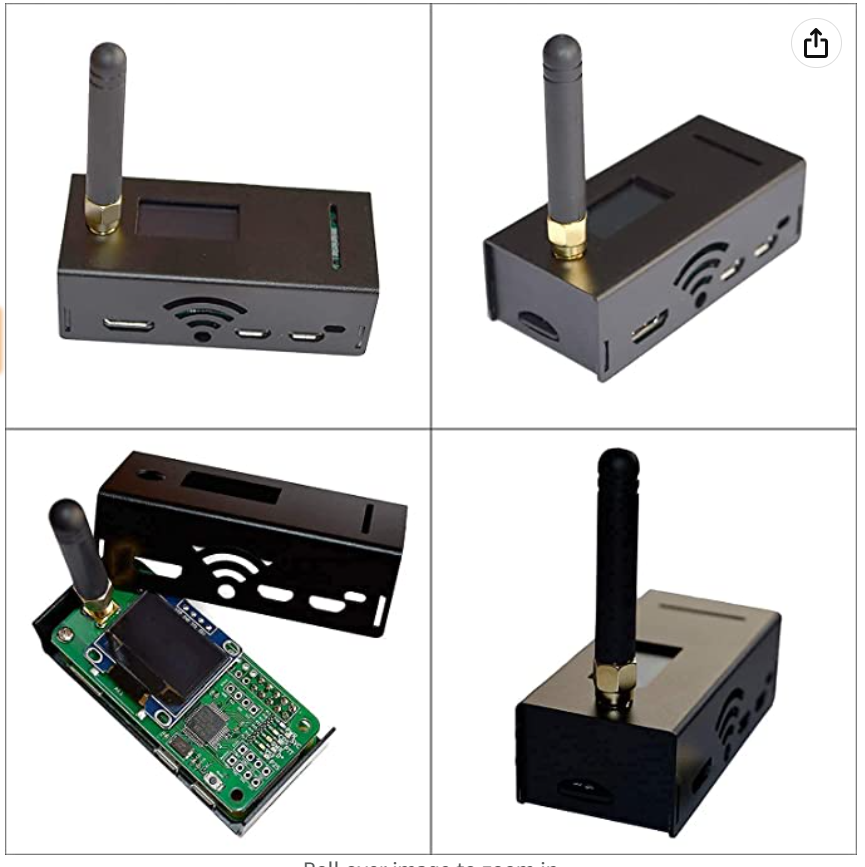
AURSINC MMDVM Hotspot Spot

There are a variety of different MMDVM hotspots available, as kits or complete. The one pictured left is the AURSINC and available on Amazon for about $190. There are more expensive versions, such as those with dual band (VHF & UHF) but I suggest that you get a UHF such as the AURSINC.
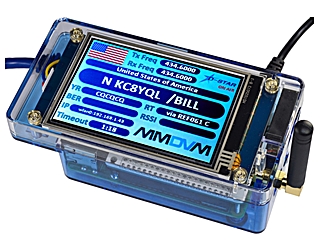
The ZumSpot Elite with 3.5″ screen (only available from HRO)

Another option, if you have the budget, is the Zumspot. It has a large display so you can see what talkgroup and who is talking without using the Pi-Star dashboard on your laptop or tablet. It is about $250 and available from Ham Radio Outlet (HRO), I’ve not found it on Amazon yet.

Setup

When you get your MMDVM you will need to do some setup, in most instances you can do this from the pi-star dashboard. I just re-did mine from scratch as I had an old version software (version 3) and it didn’t do the automatic updates that version 4 does. The site I used to take me through the steps was here and I found it very easy to follow (with some pauses in the video). Most of the time your new device will come with the current software (image) on the SD card and you will not need to re-image the SD card. You will need to set it up on your WiFi (or multiple WiFi’s).

Read all this page before attempting setup following the video. There are some parts of the video that talk to DMR settings and I’ve some screen shots and information below that might help.

The one step that I found didn’t work was using the WiFi builder on the Pi-Star dashboard. What I did was follow the notes here. That allows you to connect your laptop directly to the MMDVM using the built in WiFi. From there you can use the configuration menu directly to complete the next setup steps including adding your WiFi. The Youtube video steps you through those steps and I’m not going to try and repeat them here when there is already a very good video!

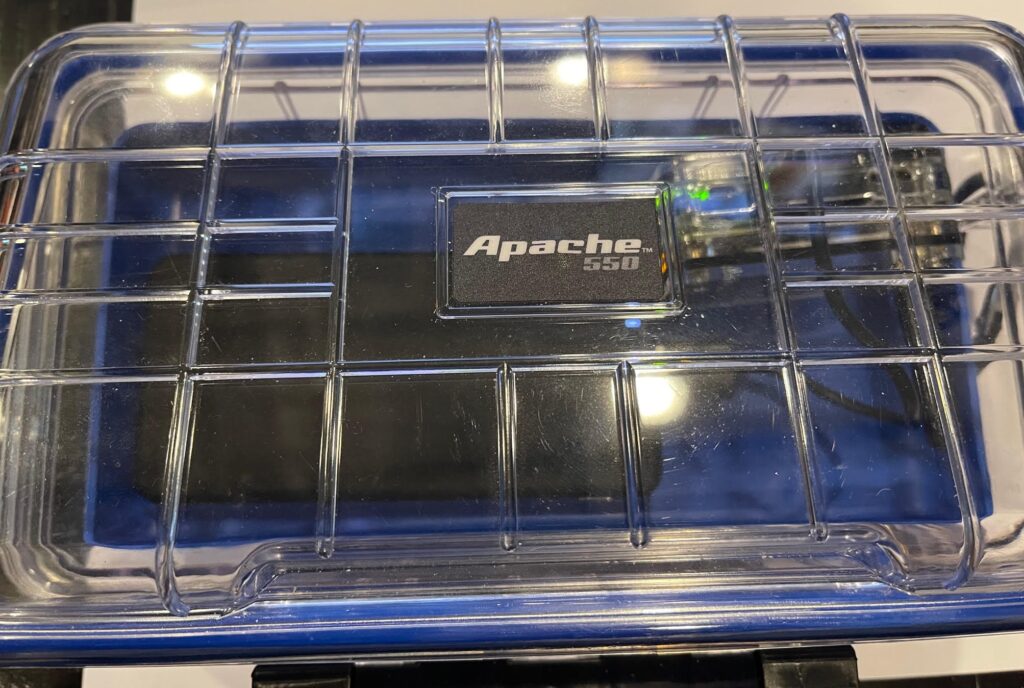
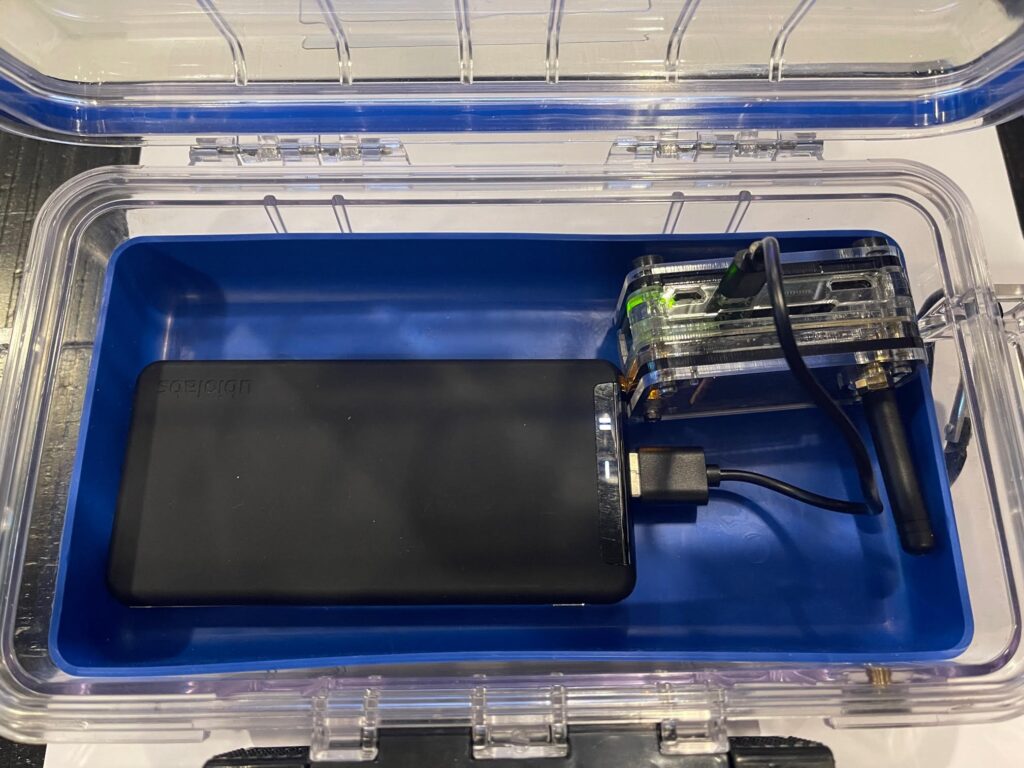
Once set up I use a battery pack and put mine in a waterproof box so that I can take it anywhere. In my case it is configured to use my MiFi (a portable WiFi), which I can place inside the box. Both the MiFi and MMDVM run off a battery with USB connections. You can set the MMDVM to work on multiple internet WiFi’s, including your cell phone hotspot, so it will connect to the one you are nearest. I suggest you only do this after you have got use to using it.
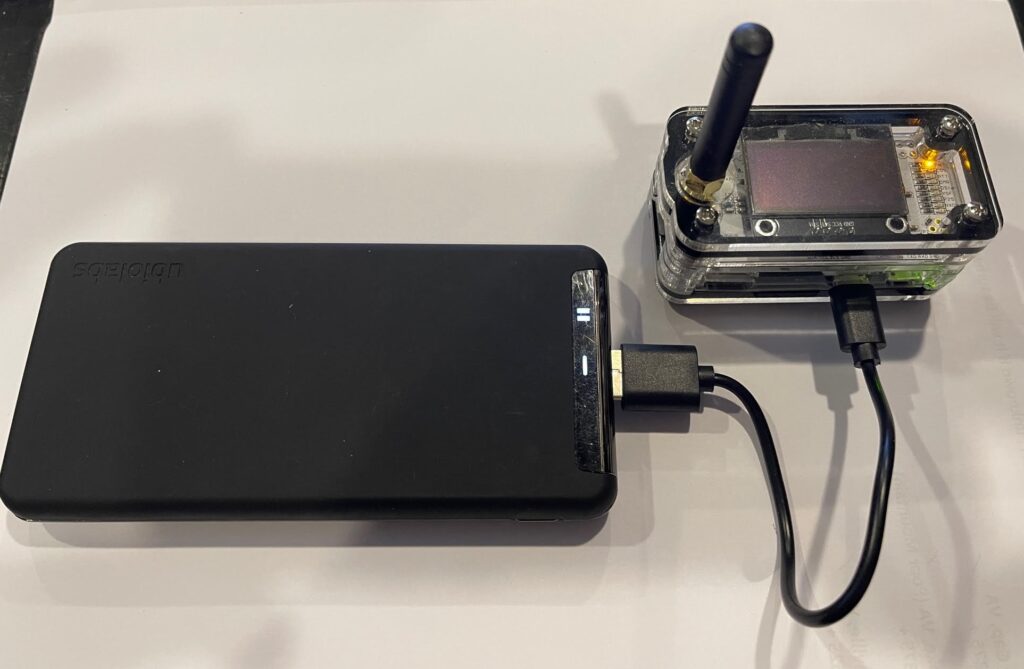
my ZumSpot RiP

The battery pack in the pictures is a Ubiolabs Power Bank, 10,000mAh, 37Wh (Watt hours) pack. It has a USB-C and USB-A outputs (both 5V/2.4A 12W). It will run the MMDVM for 3-4 days depending on the amount of use.
Dashboard
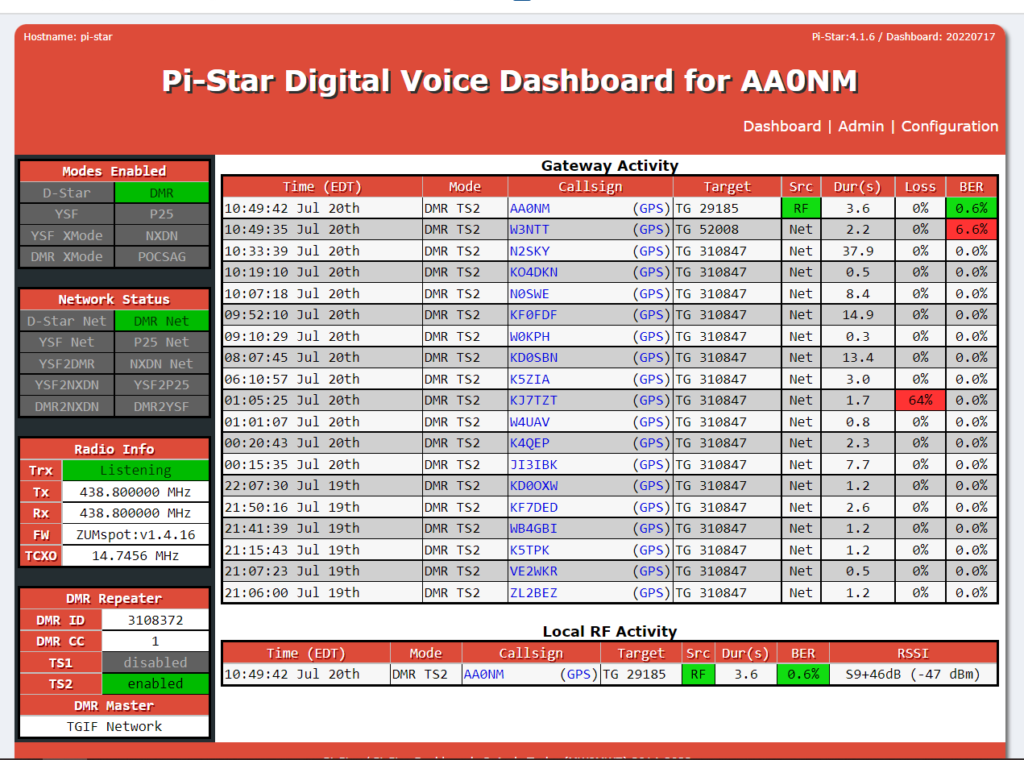
To start with I suggest you only set the device to connect to a DMR network (if you have a DMR radio, I’ll show cross mode set up on another page), as the Youtube video shows.

When you have set up the MMDVM you will program channels in your radio (low power) for each talk group (TG) you want to connect to. When you key up your radio the MMDVM will connect to that TG. One the display above at the bottom you will see the current Local RF Activity. In this example it shows that I keyed up at 10:49:42 and connected to TG 29185. So same frequency, same frequency, color code, and time slot (usually always 2), just change the talkgroup.

In the panel above, Gateway Activity, it shows that prior to connecting to TG 29185 I was connected to TG 310847 and all the transmissions received on that TG that the MMDVM re-transmitted.

Configuration
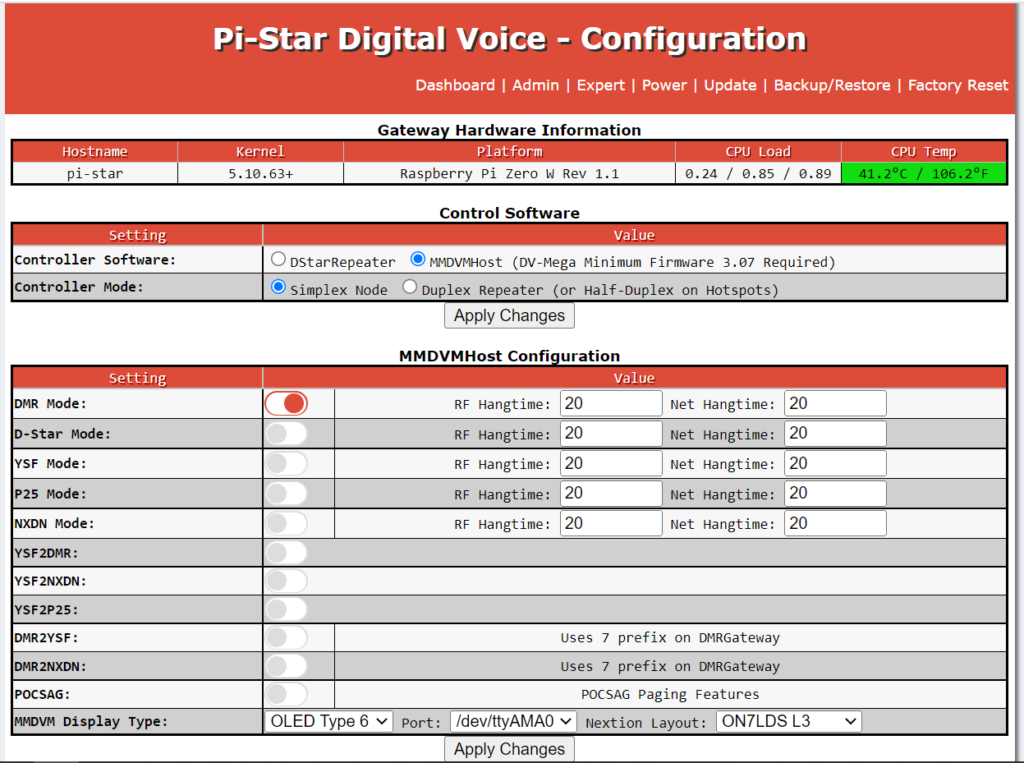
In the configuration dashboard the only option you should have on is the DMR mode if you followed the Youtube video. As you can see you have the option to enable D-Star, to connect to any of the D-Star repeaters or reflectors, as well as YSF mode which is the Fusion Wires-X connection. Again, I strongly suggest you leave all these options off until you are more experienced with using the MMDVM.

DMR Systems
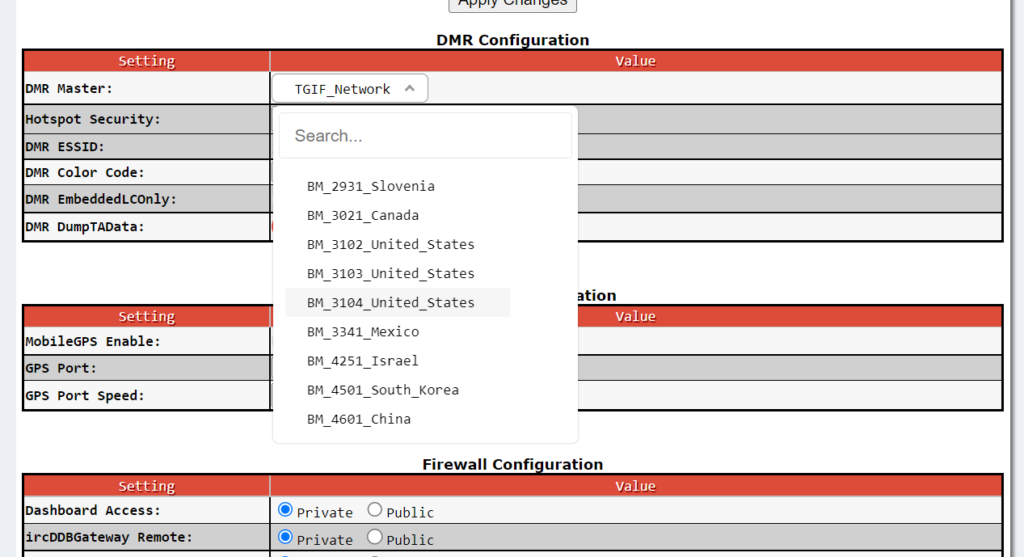
If you scroll down on the configuration page you will come to the DMR Configuration section. This is where you choose what DMR network you are connected to. If you are going to use Brandmeister then drop down to BM_3102 and select one of the US ones. If you are going to connect to the TGIF network then select TGIF_Network.

Brandmeister Network Security

Brandmeister has added additional security to their network. To access with a MMDVM you will need to create a user ID and login. Once you submit it takes about 12-24 hours for them to verify. You set your password up under my devices and then you will be able to connect.

Stump Knocker

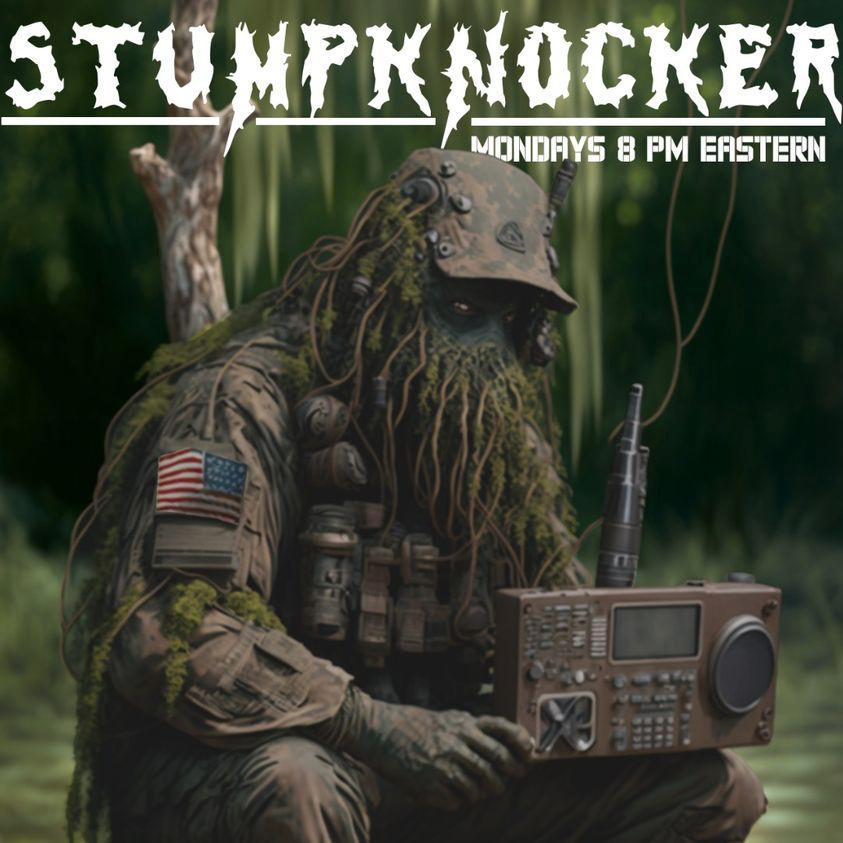
The TGIF DMR network allows groups to request a talk group. If you go to the TGIF web page dashboard you will see active or “last heard” talk groups. If you go to the talk group list page and type in Stump Knocker in the search box you will see talk group ID 29185. Set this up in your radio as a channel.

We hold a regular net on Monday evenings, 2000hrs (8pm) eastern.

Chris is usually on. Even when there isn’t a net you can usually find me listening and Chris is if he’s in his office.
Your Own TG

If you have your own MAG or family group who all have at least a Technician class ham license you can request your own TG on the TGIF network. If you have a portable set up, as I have shown above, you can set your portable up and communicate with anyone on “your” TG from anywhere you have an internet (cellular or WiFi) connection.

Another alternative is to use your radio ID as a talkgroup. Not commonly known but you can ‘direct connect’ to any repeater or any device with a DMR ID. Therefore if several of you use one of your DMR ID’s you would all be talking on the same talkgroup. With this option your talkgroup is not listed on the DMR list, i.e., on the Brandmeister or TGIF table of talkgroups. It will show up on the ‘last heard’ lists but it is doubtful that anyone would really pick up on it as those lists scroll fast and I doubt anyone would really notice that several people are using the same talkgroup, because all that shows is the number.

Now this isn’t secure, as encryption isn’t “legal” under FCC rules. So anyone with the TG ID could set it up and listen. Now if you have your MMDVM set up on a TG you will see when anyone keys up to connect to it. You don’t need to have a browser to operate the MMDVM. Once it is set up on the DMR network you want to use all TG changes are done with your radio. If you want to you can use the browser on your cell phone or a tablet to see the dashboard.

For more information on secure communications see this page.

Remember, Fortune Favors the Prepared

Semper Paratus, Semper Gumby

Login with Patreon

Login with Patreon

Search Site

Products

  • Bundle - All 4 Workbooks (FEP + NoK + PPA + HRW) - Patreon Bundle - All 4 Workbooks (FEP + NoK + PPA + HRW) - Patreon $73.95
  • Bundle - All 4 Workbooks (FEP + NoK + PPA + HRW) Bundle - All 4 Workbooks (FEP + NoK + PPA + HRW) $93.95
  • Family Emergency Plan and Household Recovery Workbooks - Patreon Family Emergency Plan and Household Recovery Workbooks - Patreon $34.95
  • Bundle - Family Emergency Plan and Household Recovery Workbooks Bundle - Family Emergency Plan and Household Recovery Workbooks $46.95
  • Household Recovery Workbook Household Recovery Workbook $29.95
  • The Continuity Chronicles Seal Decal The Continuity Chronicles Seal Decal $5.00 Original price was: $5.00.$3.00Current price is: $3.00.
  • Family Emergency Plan Workbook - Patreon Family Emergency Plan Workbook - Patreon $19.95
  • Personal Preparedness Assessment Workbook - Patreon Personal Preparedness Assessment Workbook - Patreon $19.95
  • The Next of Kin Workbook - Patreon The Next of Kin Workbook - Patreon $23.95
  • Personal Preparedness Assessment Report Personal Preparedness Assessment Report $179.95
  • Bundle - Family Emergency Plan + Next of Kin Workbooks Bundle - Family Emergency Plan + Next of Kin Workbooks $46.95
  • The Next of Kin Workbook The Next of Kin Workbook $29.95
  • ASAR — 50 Mile Radius ASAR — 50 Mile Radius $139.95
  • ASAR 50-MILE + FEP WORKBOOK ASAR 50-MILE + FEP WORKBOOK $169.95
  • ASAR — 50 Mile Radius - Patreon ASAR — 50 Mile Radius - Patreon $39.95
  • Bundle - The Series Starter (Paperback) Bundle - The Series Starter (Paperback) $29.98
  • Bundle - The Gateway Bundle - The Gateway $30.95
  • The Brush (Paperback) The Brush (Paperback) $15.99
  • The Meadow Protocol (Paperback) The Meadow Protocol (Paperback) $13.99
  • Cards (4x6) - Brevity Cards for OTP Cards (4x6) - Brevity Cards for OTP $24.95

Product categories

Cart

©2026 Fortune Favors the Prepared | Built using WordPress and Responsive Blogily theme by Superb