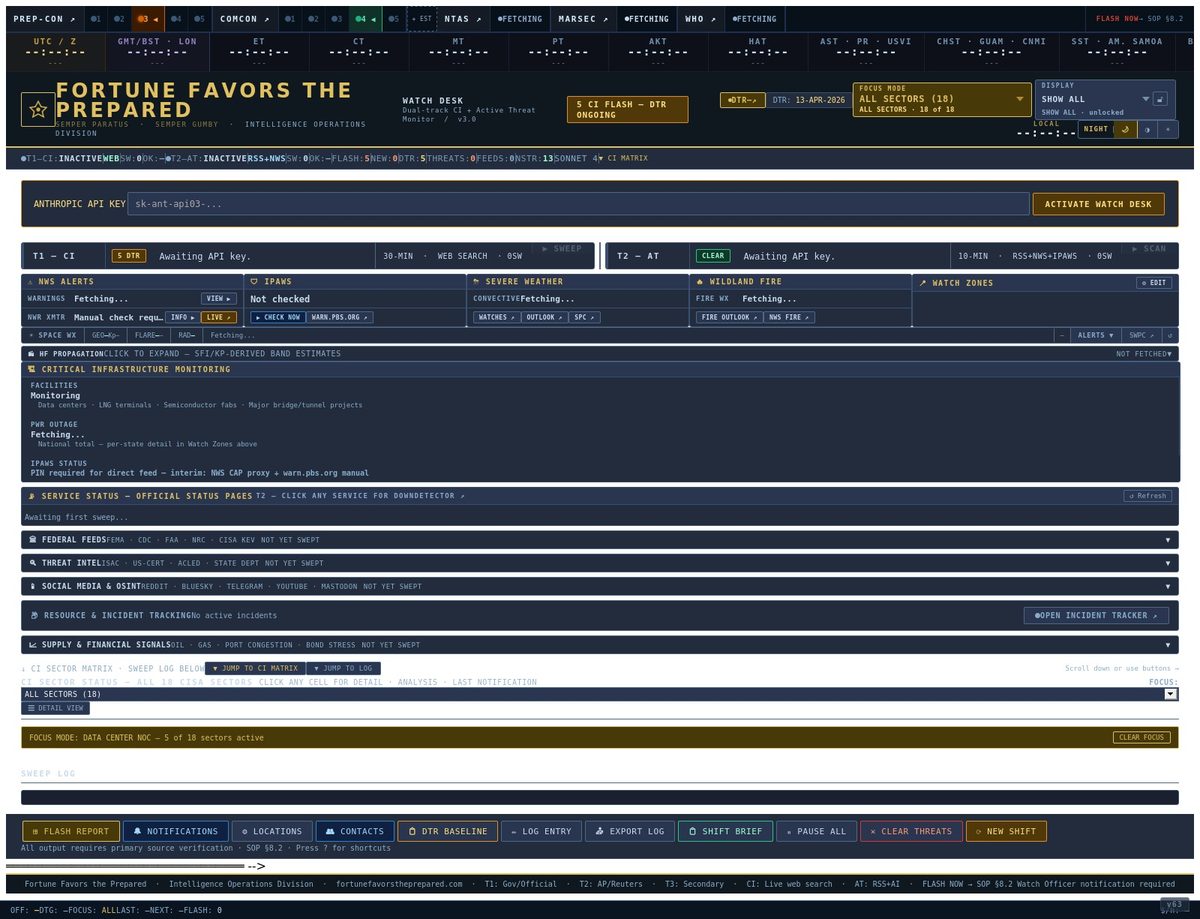
What The Watch Desk Sweeps
The desk doesn’t pull from a random list of news sites. Every source has been pre-cleared, tier-classified, and entered into the Master Source Registry that drives the entire FFTP product line.
in the master registry
from cyber to space weather
daily-sweep sources
sweep cycle
Source Tier Distribution
Federal agencies, government databases, IGOs, treaty bodies, allied-government primary sources
140
Established media, vetted industry bodies, commercial threat intelligence vendors, ISACs
102
Crowdsourced indicators and modeling tools — directional only, never standalone
5
Feed Format Distribution
Real-time syndication feeds — ingested continuously on the desk
146
Structured programmatic interfaces — highest signal-to-noise
23
Web-only sources — surfaced as analyst-driven checks
59
No public feed — surfaced as one-click launch buttons
19
Thirty Threat Areas Covered
Each sector has its own dedicated source pool drawn from the master registry. Sectors run side-by-side on the desk — a hurricane in one sector and a cyber incident in another surface together, in real time.
So you don’t get overwhelmed — the desk focuses on what you need to see.
Two hundred and forty-seven sources across thirty threat areas is a lot. Most operators only need to watch four to fourteen of those sectors, depending on their role. One click switches the entire desk into your operating profile — irrelevant sectors collapse, the relevant ones expand, the sweep loop stops wasting cycles on what doesn’t matter to you.
A hospital security director doesn’t need to see naval movements. A power utility EOC doesn’t need to track foreign state media. A SKYWARN spotter doesn’t need financial market data. Focus Mode is the difference between a dashboard that informs you and a dashboard that buries you.
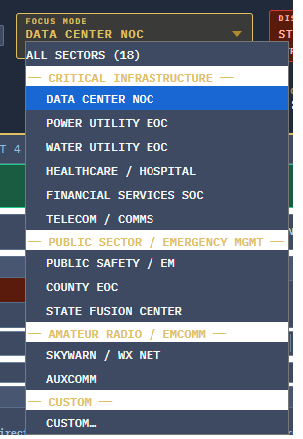
Data Center NOC
6 sectors
For data center operators, hyperscaler NOCs, and colocation facility leads. Energy and grid stability are primary; cyber and comms are constant; space weather affects upstream comms and PNT.
Power Utility EOC
7 sectors
For grid operators, balancing authorities, and utility EOC leads. Weather and space weather drive load events; cyber drives BES protection; nuclear and dam events drive coordination.
Water Utility EOC
6 sectors
For water and wastewater utility operations centers. Cyber threats to SCADA, weather-driven flow events, and upstream chemical incidents are all primary concerns.
Healthcare / Hospital
6 sectors
For hospital security directors, hospital incident command, and healthcare-system EOC leads. CDC HAN, drug shortages, mass-casualty intake, ransomware, weather-driven evacuations.
Financial Services SOC
5 sectors
For bank and exchange security operations centers. Cyber is primary; geopolitical and comms are constants; energy disruptions hit payment infrastructure.
Telecom / Comms
6 sectors
For carrier NOCs, FirstNet operations, and 911 PSAP coordination centers. Space weather, energy, cyber, and weather all hit the comms layer first.
Public Safety / EM
9 sectors
For 911 PSAP managers, municipal EM officers, and county-level duty officers in routine monitoring posture. The baseline emergency-management profile.
County EOC
14 sectors
For county-level EOC during activation or elevated monitoring. The broadest emergency-management profile — sits between municipal response and state coordination, owns the county AOR, briefs the commissioners.
State Fusion Center
9 sectors
For state-level fusion center analysts and watch officers. Cyber, geopolitical, and health surveillance are primary; everything else is contextual.
SKYWARN / Weather Net
4 sectors
For SKYWARN spotters, weather net controllers, and NWS-affiliated amateur radio operators. The narrowest preset — focused on the storm-spotter’s actual mission.
ARES / RACES / AUXCOM
10 sectors
For Auxiliary Communications volunteers activated under a served agency. Broader than SKYWARN because the mission spans hurricane response through mass-casualty support.
All Sectors / Custom
18 sectors or build your own
The default view shows all eighteen CISA critical infrastructure sectors. Or build a custom profile — pick the three to fourteen sectors that match your role, save the preset, share it with your team.
SPOTLIGHT — COUNTY EOC PROFILE
What a county EOC manager actually sees during an activation.
The County EOC profile is the broadest of the emergency-management presets because the county AOR is where almost every kind of incident lands. Below is what each sector contributes to the county EOC view — the operational rationale behind every sector that’s “on” in this profile.
Now restrict the desk to your actual jurisdiction.
Focus Mode narrows the desk by sector. Geographic Scope narrows it by location. Pick one state, all your mutual-aid neighbors, or a list of specific counties down to FIPS-code precision. NWS warnings, IPAWS alerts, FEMA declarations, and power-outage feeds filter to your selection. Cyber, geopolitical, and space-weather feeds are deliberately not filtered — those threats don’t care about state lines.
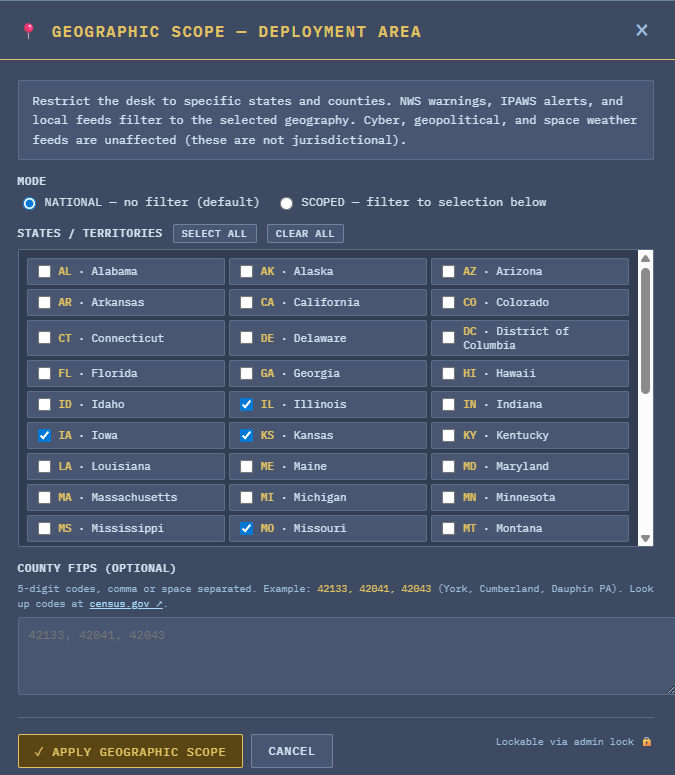
No filter
All national feeds visible. The right setting for analyst tier and any role with national or cross-jurisdictional responsibility.
Filter to states + counties
Choose from 50 states, DC, and 5 inhabited territories via checkboxes. Add 5-digit county FIPS codes for sub-state precision. The desk filters and the AI sweep prompts honor your deployment area.
✓ Filters to your geography
- ✓NWS warnings (matched by SAME/UGC codes)
- ✓IPAWS alerts
- ✓FEMA disaster declarations
- ✓Power outage feeds (state-level)
- ✓AI sweep prompts — analyst guidance scoped to your area
— Not filtered (non-jurisdictional)
- —Cyber threats & KEV catalog
- —Geopolitical events
- —Space weather & HF propagation
- —Service status pages (global)
- —Anything that doesn’t respect state lines
SCOPED → home state + own county FIPS + mutual-aid neighbor counties. NWS warnings, FEMA declarations, and power outages filter to the AOR. The desk reads like the EM director’s own briefing book.
SCOPED → whole state, no county filter. All in-state IPAWS, NWS, and FEMA activity surfaces; out-of-state items drop unless they meet a national-threat threshold.
SCOPED → NWS office’s county warning area, by FIPS. Storm-spotter sees only warnings inside the net’s CWA; HF propagation and space weather (which the spotter still needs) stay unfiltered.
SCOPED → states where hospital facilities operate. CDC HAN and FDA shortages still global (they should be), but local NWS, power outages, and IPAWS scope tight to facility geography.
Enterprise deployments can admin-lock both Focus Mode and Geographic Scope, so seat-level operators see exactly the slice their organization defined. No drift, no off-mission distraction.
What the desk actually generates.
The hero screenshot shows the dashboard. Below is what the dashboard produces — the live warnings stream, the operator’s choice of which threads to escalate, and the FLASH reports themselves with analyst commentary attached.
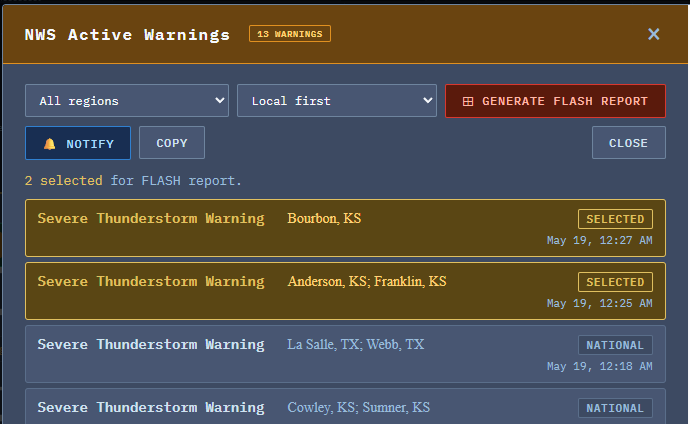
Active Warnings Panel
The desk’s live warning stream — NWS alerts, IPAWS messages, FEMA declarations, and sector-tagged events flowing through in real time, color-coded by severity and tier.
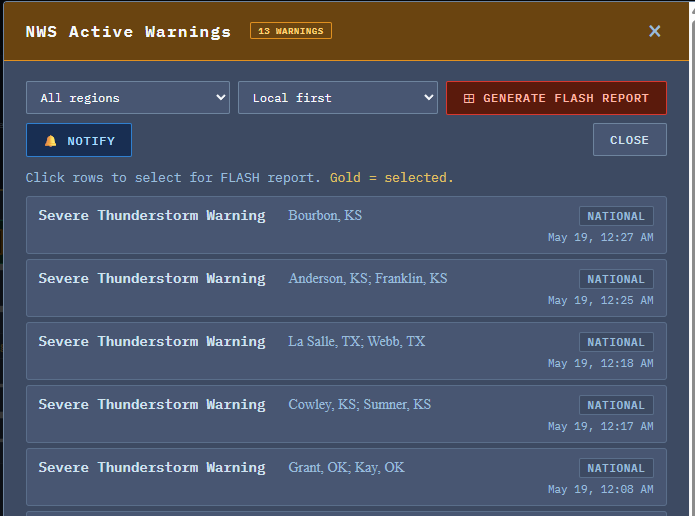
Selectable FLASH Reports
The operator decides which threads warrant a formal FLASH report. Tick the events that matter to your AOR; the desk pulls them into the report queue for analyst escalation.
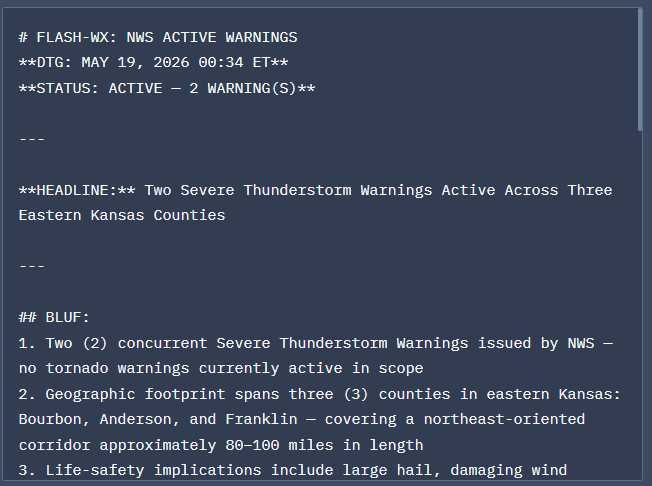
Generated FLASH Reports
The formal FLASH reports the desk produces — properly sourced, tier-tagged, and structured for ingestion into your existing situation report or briefing flow.
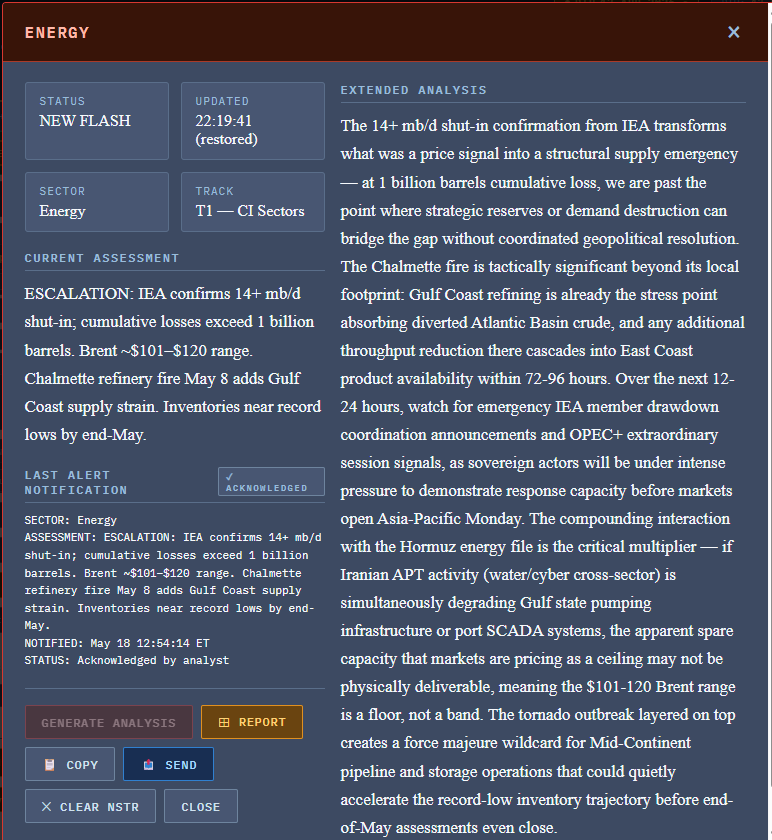
Sector FLASH with Analysis
An individual sector FLASH alert with the analyst commentary layer attached — context, second-order effects, watch items, and source tier all in one piece.
Every alert links to its source. Every source carries its tier. Every report cites everything it draws on.
“Thirty years on the receiving end of three-AM emergencies. Built for practitioners who can’t afford a dashboard that lies to them.”
01.Every Source Earns Its Place
Every one of the 247 sources in the registry is classified into one of three tiers before it can surface an alert. The tier governs the evidentiary weight of any claim built on that source. You see the tier on every item, every time.
Authoritative & official
Federal agencies with statutory authority over the relevant sector. Government databases that are themselves the system of record. International governmental organizations and treaty bodies. Allied-government public communications.
Established & credentialed
Established media organizations, vetted industry bodies, commercial data providers, and professional monitoring services with demonstrated accuracy records. Fills gaps not covered by Tier 1; corroborates Tier 1 findings.
Indicators only
Crowdsourced data, open modeling tools, community-generated feeds. Useful as directional checks. Never cited as standalone sources — a single Tier 3 source carries an UNCONFIRMED rating.
02.Adversary State Media Is Flagged Every Time
The framing caveat is the single most important editorial rule in our methodology. It is what protects your decision-making from being subtly steered by a foreign information operation. Seven sources in the current registry carry this caveat.
Never standalone. Always framed.
Russian state news agencies, Iranian state-affiliated outlets, Chinese state agencies, and government press offices of adversary states are never cited standalone for factual claims about events, casualties, damage, or impact. When they appear on the desk, they appear with explicit framing: “Russian state media claims…”, “Iranian state-affiliated outlet reports…”, “Chinese state agency stated…”. The reader always knows what they are looking at.
These sources are surfaced only for three reasons: official regime positioning the regime wants on the record, leadership intent and rhetoric inside the regime’s information environment, or one side of a deliberate dual-source check against an independent source covering the same event.
What you will never see on this desk
- Aggregator content republished without the original primary attribution
- Encyclopedic sources cited as operational data
- Adversary state media cited as fact without the framing caveat
- Vendor advisories republished by content farms in place of the vendor’s own primary feed
- Crowdsourced indicators presented as standalone claims
- Single-source claims at any tier without an explicit UNCONFIRMED flag
03.Why This Watch Desk Is Different
There are other dashboards. Here is what distinguishes this one.
Practitioner-built
Built by a thirty-year emergency management professional — Incident Commander on multi-day activations, Emergency Operations Manager at a major US international airport, federal contractor on the national public alerting program. Not built by a marketing team or a venture-backed startup with no operational reps.
Methodology you can audit
Every tier, every framing caveat, every refused citation traces back to a published, public methodology. You can hold the desk accountable against its own standard. The discipline is the product.
Integrated with the analyst layer
The desk doesn’t operate alone. Every morning’s Daily Threat Report becomes the desk’s baseline — items already covered show quietly, only genuinely new information demands attention. The real-time and analytical layers run together, deliberately.
Focus Mode & Geographic Scope by design
Twelve role-specific Focus Mode presets, plus state-and-county Geographic Scope down to FIPS-code precision. Filter by what threats matter to you AND where you operate. The desk respects your time — it’s not trying to be every dashboard for every reader.
Planned Access Tiers
The Watch Desk is in active development. When public access opens, it will be offered in three tiers. Contact us for early-access pilots and launch notifications.
FREE PUBLIC VIEW
Watch Desk — Public
An embedded read-only view of the live desk. Bookmark it, share it, leave it on a second monitor.
- ✓Live sector grid across all eighteen CISA critical infrastructure sectors
- ✓Live conditions strip (PREP-CON, COMCON, WX-CON, SWX-CON, CYBERCON, FPCON)
- ✓Federal Feeds, International & Maritime, and Threat Intel panels
- ✓“All Sectors” view only — Focus Mode requires the Operator tier
OPERATOR TIER
Watch Desk — Full Access
The full operational tool. Includes all twelve Focus Mode presets plus custom configuration. Built for security professionals, EMCOMM operators, county EMs, and small-business security leads.
- ✓Everything in the Public view
- ✓All twelve Focus Mode presets (Data Center, Power, Water, Healthcare, Financial, Telecom, Public Safety, County EOC, Fusion Center, SKYWARN, ARES, plus Custom)
- ✓Geographic Scope — restrict the desk to your state(s) and counties by FIPS code
- ✓DTR baseline upload — load today’s report, suppress redundant alerts
- ✓Browser notifications and audio chimes for non-baseline alerts
- ✓Acknowledge-once notification pattern
- ✓Shift transition briefing generator
ENTERPRISE LICENSE
Watch Desk — Embedded
Embed the desk in your own SOC, EOC, executive briefing room, or operations dashboard. Multi-seat, white-label or co-brand options, and custom configuration. Early-access pilots being scoped now.
- ✓Everything in Operator tier, multi-seat
- ✓Embeddable iframe with your organization’s branding
- ✓Custom Focus Mode profiles for your specific roles
- ✓Admin-locked Focus Mode & Geographic Scope — seat-level operators see only your defined slice
- ✓Custom alerting rules and notification routing
- ✓Quarterly briefing call with the analyst
- ✓Direct support and escalation channel
Frequently Asked Questions
Public launch timeline is being finalized. The current development version (v67) is in operational use by the analyst team. Early-access pilots for enterprise customers are being scoped now. Use any contact link on this page to be notified at launch.
Pick the preset that matches your operating role from a dropdown at the top of the desk. The sector grid collapses to only the sectors in that profile, the feed panels filter accordingly, and the underlying sweep loop saves cycles by skipping sources not relevant to your active sectors. You can switch presets in one click — or build a custom profile and save it.
Yes. Two modes: NATIONAL (default, no filter) or SCOPED. In SCOPED mode you select from 50 states, DC, and 5 territories via checkboxes, and you can add 5-digit county FIPS codes for sub-state precision. NWS warnings, IPAWS alerts, FEMA declarations, and power outage data filter to your selection — and the analyst sweep prompts get told to prioritize events in your area. Cyber threats, geopolitical events, and space weather stay unfiltered because they’re non-jurisdictional. The county-level FIPS list is plain text and easy to copy across deployments.
The Master Source Registry behind the Watch Desk contains 247 unique sources across thirty threat-area sectors. Of those, 169 publish machine-readable feeds (RSS or JSON API) that the desk can sweep in real time. The remaining 78 (HTML and launch-only sources) are surfaced as one-click launch buttons for analyst-driven checks. Focus Mode further narrows what’s actually swept on each cycle based on your active sectors.
No. The Watch Desk is an open-source situational-awareness layer. It surfaces what is publicly known across the relevant critical-infrastructure sectors plus the international and geopolitical layers. It sits alongside your SOC, EOC, or executive briefing room — not in place of them. Enterprise customers embed it as one panel in a larger operational picture.
Trust nothing without independent verification. The desk is built to make that verification fast — every item shows its tier, its sector, its source category, and its publication time. The methodology is published openly so you can hold the desk accountable. For consequential decisions, use the desk to find the signal and then verify against the primary source it points to.
The right intelligence, in the right view, at the right time.
The Watch Desk is in active development. Contact us to be notified at launch, to inquire about enterprise early-access pilots, or to discuss custom Focus Mode profiles for your operation.