Pocket Wireless Recon Devices: What They Are, Why They Matter, and How to Defend Against Them
Published: Fortune Favors the Prepared · Practical preparedness information for families, households, and communities
A class of pocket-sized wireless reconnaissance devices, sold openly on Banggood, AliExpress, Amazon, and Tindie for $25 to $200, now puts capabilities that once required a laptop and a directional antenna into a tool the size of a deck of cards. The most common are the ESP32 Marauder family and the Flipper Zero. Owning one is legal in most jurisdictions. Many of the things they can do are not.
These devices have legitimate uses in security research, authorized penetration testing, amateur radio experimentation, and home network audit. They also represent a real, low-cost adversary capability against households, small businesses, events, and public venues. This page explains both sides so you can recognize, defend against, and where appropriate, use them yourself.
Possessing these devices is generally lawful. Operating many of their offensive functions against networks, devices, or people you do not own or have written authorization to test is a violation of US federal law (Computer Fraud and Abuse Act, Wiretap Act, FCC Part 15), and is a felony in most US states and most foreign jurisdictions. Marriott paid a $600,000 FCC fine in 2014 for using Wi-Fi deauthentication against guest hotspots in their own hotels. The fact that a tool can do something is not legal authority to do it. Test on your own gear, in your own RF space, or under a signed engagement letter. Nothing on this page is legal advice.
What These Devices Look Like
Two reference photographs. If you see one of these in a public space, at a venue, in a vehicle, or in a bag, this is what you are looking at. Recognition is the first defensive skill.
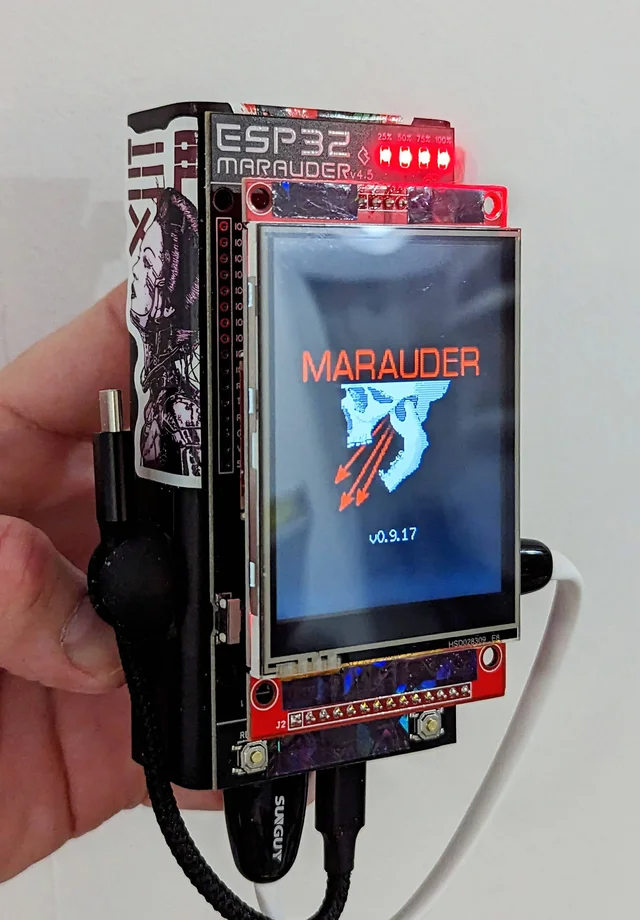
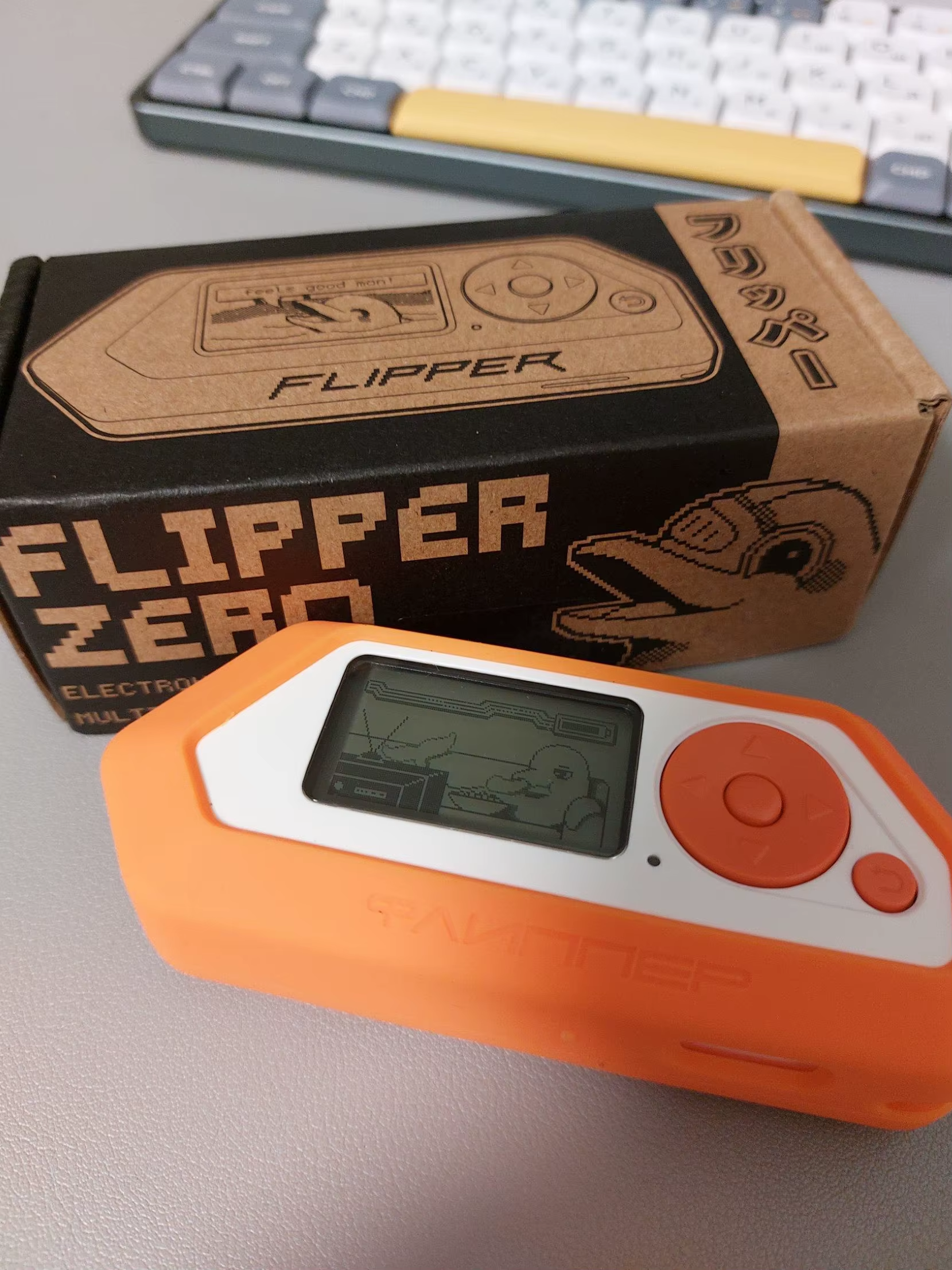
Two devices, two roles. Between them they reach most of the consumer wireless spectrum.
The Spectrum They Reach
What These Devices Are
ESP32 Marauder
The Marauder is open-source firmware (maintained by JustCallMeKoko on GitHub) that turns a generic ESP32 microcontroller board into a Wi-Fi and Bluetooth analysis tool. The hardware is commodity: a $5 chip, a small color touchscreen, a microSD slot, a USB-C port, and a battery. Hundreds of vendors sell pre-flashed boards under names like Predator, Predator Mini, M5Stick, Cheap Yellow Display (CYD), Dev Board Pro, Double Barrel, and Apex 5.
It scans, sniffs, captures, and (with caveats) interferes with 2.4 GHz and, on newer ESP32-C5 boards, 5 GHz Wi-Fi and Bluetooth Low Energy. It does not do sub-GHz, RFID, NFC, or IR by itself.
Flipper Zero
The Flipper Zero is a commercial pocket device (Flipper Devices Inc., ~$169) that covers the rest of the RF spectrum the Marauder ignores: sub-GHz (300 to 928 MHz), 125 kHz RFID, 13.56 MHz NFC, infrared, iButton (1-Wire), and GPIO for expansion. It does not have a native Wi-Fi or Bluetooth radio. To get those, you plug a small Wi-Fi Devboard (which is an ESP32) into its GPIO header and run Marauder firmware on it. The two devices, taken together, cover most of the consumer wireless spectrum.
The broader class
Around these two platforms sits an ecosystem of related devices, each filling a niche:
- HackRF One / HackRF Portapack H4M — software-defined radio, 1 MHz to 6 GHz, transmit and receive. Far more capable than a Flipper, much steeper learning curve.
- Wi-Fi Pineapple (Hak5) — higher-end rogue access point / man-in-the-middle platform.
- O.MG Cable, Bash Bunny, USB Rubber Ducky — HID injection (BadUSB) tools that look like ordinary cables or thumb drives.
- Pwnagotchi — Raspberry Pi Zero W in a small case that automatically captures Wi-Fi handshakes for offline cracking.
- NodeMCU / ESP8266 Deauther — the original (Spacehuhn) project that Marauder evolved from.
- Apex 5, Double Barrel 5G — consolidation modules (ESP32-C5 plus sub-GHz plus nRF24 plus GPS) that fold most of the above into a single Flipper expansion.
Capability Matrix
What each device can actually do, side by side. “Yes” = native capability. “Add-on” = requires an expansion board. “No” = not supported.
| Capability | ESP32 Marauder | Flipper Zero | HackRF Portapack |
|---|---|---|---|
| Wi-Fi 2.4 GHz scan / sniff | Yes | Add-on | Partial |
| Wi-Fi 5 GHz (C5 chipset only) | C5 only | Apex 5 add-on | No |
| Wi-Fi deauthentication / disassociation | Yes | Via Marauder add-on | No |
| Beacon / SSID flood | Yes | Add-on | No |
| Evil Portal (captive portal phishing) | Yes | Add-on | No |
| PMKID / WPA handshake capture (PCAP) | Yes | Add-on | Partial |
| BLE scan / spam (sour apple, AirTag spoof) | Yes | Add-on | No |
| Wardriving with GPS | GPS variants | Add-on | No |
| Sub-GHz (315/433/868/915 MHz) | No | Yes | Yes |
| 125 kHz RFID (EM4100, HID Prox) | No | Yes | No |
| 13.56 MHz NFC (MIFARE, NTAG) | No | Yes | No |
| Infrared (universal remote) | No | Yes | No |
| iButton (1-Wire) | No | Yes | No |
| USB HID injection (BadUSB) | No | Yes | No |
| Full SDR (1 MHz to 6 GHz) | No | No | Yes |
| Typical retail price | $25 to $80 | $169 plus add-ons | $400 and up |
The Marauder is the Wi-Fi/BLE specialist. The Flipper is the multi-protocol generalist that needs a Marauder companion to cover Wi-Fi/BLE. The HackRF is the deep-RF research platform. For a household preparing for a venue threat assessment or a small business doing self-audit, the Marauder alone is enough. For a more complete picture of consumer wireless threat, you want both a Flipper and a Marauder board.
Legitimate Uses (The “Good Guy” Side)
For households and preppers
- Audit your own home network. See which devices are talking, which are leaking BLE, whether your router is broadcasting an outdated SSID, whether your Wi-Fi password is strong enough to resist a captured handshake.
- Identify rogue devices. An unexpected BLE beacon in your house, a Wi-Fi probe request from a device you do not recognize, an AirTag traveling with you that is not yours.
- Test physical security at home. Confirm whether your garage door opener, car key fob, or smart lock uses a static code (replayable) or a rolling code (secure). A Flipper will tell you in 30 seconds.
- Learn the spectrum. For a household serious about preparedness comms, owning one of these is the cheapest, fastest way to understand what is in the air around you.
For security and emergency management professionals
- Pre-event RF site survey. Walk an expo, conference, or operations center venue with a Marauder logging APs, channel utilization, BLE traffic, and rogue access points. Feed this into the event security annex.
- EOC / venue threat assessment baselining. Establish the normal RF environment so you can recognize anomalies during operations.
- Authorized penetration testing. With a signed engagement letter, these are field-credible tools for testing Wi-Fi infrastructure, BLE-based access control, and proximity card systems.
- Tabletop and red-team exercise injects. A Flipper or Marauder on the table during a HSEEP exercise grounds the discussion in something physical the players can hold.
- Detection training. You cannot detect a deauth flood, a beacon spam, or an evil portal in the field unless you have seen one. Owning the offensive tool is how blue teams learn what the indicators look like.
For amateur radio operators
- Spectrum visualization in the 2.4 GHz and sub-GHz ISM bands.
- APRS, LoRa, and Meshtastic experimentation (with appropriate add-on modules).
- Education and outreach at hamfests, expos, and STEM events.
- Note for licensees: nothing on these devices operates in amateur allocations in any meaningful way. They are 2.4/5 GHz Wi-Fi and 433/868/915 MHz ISM. Your HF and VHF/UHF amateur kit is unaffected.
Adversarial Uses (The OPFOR Side)
The same device class, in the hands of someone with hostile intent, supports a credible threat catalog. Understanding this is not endorsement, it is situational awareness. None of the following requires advanced skill. Most works out of the box with the pre-flashed firmware these devices ship with.
Against households
- BLE spam (sour apple, AirTag spoof, Samsung pop-ups) — floods phones in a 30-foot radius with pop-up notifications. Disruptive, not compromising. Can be used to drive a target out of a space or to mask other activity.
- Wi-Fi probe sniffing — captures the SSIDs your phone has previously connected to (home, work, hotels, airports, parents' house). Useful for profiling, geolocation history reconstruction, and social engineering pretexts.
- Wardriving — logs every Wi-Fi network in a neighborhood with GPS coordinates. Standard pre-incident surveillance.
- WPA2-PSK handshake capture — deauths your devices, captures the four-way handshake when they reconnect, takes the PCAP home for offline cracking. Weak or common passphrases fall in minutes. A 14-character random passphrase resists this attack indefinitely with current hardware.
- PMKID attack — same outcome (offline-crackable hash), no deauth required, harder to detect.
- Evil Portal — broadcasts a fake “FreeWiFi” or clones your home SSID, presents a captive portal that looks like your router's admin page or your ISP's login, harvests the credentials you type.
- Static-code key fob / garage door cloning (Flipper sub-GHz) — older systems without rolling codes are trivially replayable.
- 125 kHz prox card cloning (Flipper) — many older office, apartment, and storage facility access cards have no cryptography. A 2-second tap to copy.
- NFC tag reading and cloning — MIFARE Classic cards with known or weak keys clone in under a minute.
Against events, expos, and public venues
- Deauth flooding against a venue's Wi-Fi can take down badge readers, IP cameras, VoIP handsets, mobile point-of-sale, and operations LAN. At an expo or conference, this disrupts registration, payment, and security coordination simultaneously.
- Rogue AP / Evil Portal in a high-traffic public venue harvests credentials from attendees who join “ExpoFreeWiFi” without checking.
- BLE flood in a confined crowd creates phone disruption across hundreds of devices, useful as cover for shoplifting, distraction, or as a standalone nuisance attack.
- Pre-event wardriving establishes which APs, which channels, which client counts. Standard pre-incident surveillance against any venue.
Against small business and small-jurisdiction infrastructure
Large enterprises run wireless intrusion detection (Cisco CleanAir, Aruba RFProtect, Meraki Air Marshal) that picks up most of these attacks automatically. Small businesses, churches, schools, municipal offices, and small-jurisdiction EOCs typically do not. They run a consumer or small-business router, default settings, no monitoring. They are the population this device class is most effective against.
Defensive Guidance (What You Can Actually Do)
Household and small business
- Long, random Wi-Fi passphrase. 14 or more characters, no dictionary words. This single change defeats handshake-capture attacks indefinitely with current hardware. Use a password manager, do not memorize it.
- WPA3 or WPA2/WPA3 transition mode on your router. If your router does not support WPA3, replace it. Routers older than 2019 are likely WPA2-only.
- Enable 802.11w (Protected Management Frames) in router settings. This is the single best defense against deauthentication and disassociation attacks. Most Wi-Fi 6 and Wi-Fi 6E routers default to this; check yours.
- Separate IoT / smart home onto a guest or VLAN network. Your camera, doorbell, smart plug, and TV do not need to be on the same network as your laptop.
- Disable WPS on the router. It has known weaknesses and almost no one uses it.
- Replace old static-code garage door openers and key fobs with rolling-code systems. If your opener predates 2011 or your fob predates 2010, assume it is replayable.
- Replace 125 kHz prox cards with 13.56 MHz cards using DESFire EV2 or EV3 cryptography. Older HID Prox and EM4100 cards have no security at all.
- Turn off Bluetooth and Wi-Fi on phones when not in use, particularly in public venues. Most modern phones randomize MAC addresses by default; verify yours does.
- Treat “FreeWiFi” like a free needle. Use mobile data or a VPN in public venues. Never enter a credential into a captive portal that asks for one.
Events, expos, and public venues
- Pre-event RF site survey. Walk the space with a Marauder or comparable tool. Log the normal RF environment so anomalies are detectable during operations.
- Wireless Intrusion Detection System (WIDS) appropriate to the venue scale. For mid-size venues, a Meraki Air Marshal license or comparable is the minimum.
- Operations comms on a hardened channel. Ham radio (with appropriate licensing), commercial LMR, or wired backbone for badge readers, payment, and security cameras. Do not put life-safety functions on consumer Wi-Fi.
- Hidden SSID for ops nets. This is not security, it is friction. It does reduce casual targeting.
- Channel planning to leave 802.11w-protected channels available for ops use.
- Brief venue staff on indicators: sudden Wi-Fi disconnects across the venue, captive portal pages appearing unexpectedly, mass BLE pop-ups, employees reporting “the badge reader stopped working.” These are detection cues.
- Pre-coordinate with local law enforcement on jurisdictional response if attacks are detected. RF attacks against critical infrastructure are federal violations.
Emergency management and EOC operations
- Add wireless threat to the venue threat assessment template. This category is now commodity. It belongs alongside fire, medical, severe weather, and active threat in any modern soft-target assessment.
- EOC primary comms should not rely on consumer Wi-Fi. If your EOC's VoIP, badge access, or camera system depends on a single Wi-Fi infrastructure, you have a single point of failure that a $30 device can hit.
- Tabletop exercise inject: “During the activation, all EOC Wi-Fi devices begin disconnecting and reconnecting in waves. What is your team's response?”
- Mutual aid comms plan that does not assume Wi-Fi continuity. Ham radio operators with your jurisdiction's ARES/RACES are an underused asset here.
Detection Indicators
What it looks like when one of these devices is being used against you or near you. Train your eye and your team.
| Attack | What the victim sees | What a defender sees |
|---|---|---|
| Deauth flood | Phones, laptops, tablets repeatedly disconnect and reconnect to Wi-Fi. Streaming buffers. Smart home devices drop. Symmetric across multiple users. | Wireless IDS alerts on 802.11 deauthentication frame anomaly. Multiple client disassociations from a single source MAC. Channel utilization spike. |
| Beacon / SSID flood | Phone Wi-Fi list fills with dozens or hundreds of fake SSIDs. Often profane, joke, or pop-culture names. | WIDS alerts on rogue beacon frames. Channel saturation. Source MAC frequently spoofed but pattern is detectable. |
| Evil Portal / rogue AP | An SSID matching the venue or home network appears with strong signal. Joining presents a captive portal asking for login or admin credentials. | Two APs broadcasting the same SSID. The rogue is usually weaker signal at the AP location. Air Marshal flags it as “Spoofing AP.” |
| BLE spam | iOS users see “AirPods” or “Apple TV” pop-ups every few seconds. Android users see similar Fast Pair pop-ups. Affects phones within 30 feet. | BLE advertising packet rate spike. Bluetooth analyzer (Wireshark with BLE adapter) shows malformed advertisements. |
| Wardriving | Nothing. Passive scanning is undetectable from the client side. | Generally undetectable. Mitigated by enabling MAC randomization on clients and not broadcasting unique SSIDs. |
| Sub-GHz replay (Flipper) | Garage door opens unexpectedly. Key fob seems “cloned.” Older car alarms or RF doorbells trigger without action. | Requires sub-GHz monitoring (SDR). Most households will not detect; replace with rolling-code systems instead. |
| Prox card cloning | Nothing at the time. May see unauthorized facility access on logs later. | Access control logs show same credential used in two places, or used outside normal pattern. Upgrade card technology. |
Operational Awareness
If you do not own one of these devices yourself, the operational question is not where to buy one. It is what to know about the threat surface they represent in your environment. Three areas of awareness matter.
The supply chain reality
These are not specialist tools that take effort to acquire. The ESP32 microcontroller costs about $5 in single quantities. The Flipper Zero is sold openly on the manufacturer's website and ships internationally in days. Marauder firmware is open-source on GitHub. Hundreds of Chinese sellers offer pre-flashed boards on the major e-commerce platforms with one-week delivery to most countries. There is no licensing, no background check, no skill barrier. A motivated adversary can be operational in seven days for under $100. The threat surface is not theoretical and not exotic. It is commodity.
What signals quality vs. counterfeit
This matters defensively for two reasons. First, if you are evaluating whether a device you have found, confiscated, or been shown is genuine, the signs below help. Second, if your organization is doing authorized penetration testing or RF site survey work and a partner shows up with one of these, you want to know whether their tool will actually function.
- Build quality. Reference-grade boards have CNC-machined or injection-molded enclosures, secure USB-C ports, and stable antenna mounting. Cheap clones have rough 3D-printed cases, loose ports, and antennas held on with friction fit alone.
- Firmware behavior. A genuine Marauder running current firmware will display a version string on boot and have a stable, navigable menu. A bad clone may crash mid-scan, fail to write to the SD card, or run an outdated firmware fork that lacks modern features.
- Battery and power. Quality builds report battery percentage and last 4 to 8 hours on Wi-Fi scanning. Low-end clones drain in under an hour or report nonsense battery levels because of poor power regulation.
- Counterfeit Flippers are widespread and ship with backdoored firmware, modified bootloaders, or no working radio at all. Anything sold under a different brand name, or significantly cheaper than the manufacturer's direct price, is almost certainly counterfeit and unsafe to plug into any trusted system.
Red flags in your environment
If you are responsible for the security of a venue, a small business, a workplace, or a household, these are the behaviors that indicate one of these devices may be in unauthorized use nearby:
- A person sitting still in a vehicle or seating area with a small touchscreen device and an external antenna, particularly near a building's exterior wall, parking structure, or main entrance. Wardriving and probe sniffing happen passively, often from a stationary observation position.
- Repeated drive-by passes of a facility by the same vehicle, particularly at slow speed. Pre-incident surveillance against any target with wireless infrastructure now routinely includes RF mapping.
- Sudden wireless symptoms across your venue or facility: phones disconnecting from Wi-Fi in waves, captive portal pages appearing where they should not, mass Bluetooth pop-ups in a crowd, badge readers or VoIP handsets going offline together. Each of these is a defensive indicator covered in the Detection Indicators section above.
- Unfamiliar SSIDs appearing that closely mimic your venue's legitimate network name with small differences (extra characters, transposed letters, alternate capitalization).
- Personnel reporting “the Wi-Fi is acting weird” in a way that doesn't match a normal router or ISP outage. Train your team to escalate this rather than dismiss it.
If you suspect unauthorized RF reconnaissance against your facility, treat it as a security incident, not a curiosity. Document time, location, vehicle description, and observed behavior. Preserve any wireless logs from your APs or WIDS. Notify law enforcement if the activity is sustained or targets critical infrastructure; depending on what is being attacked, this may fall under FCC, FBI, or state cybercrime jurisdiction. Do not attempt to confront the operator directly.
For authorized testing
If your organization conducts authorized wireless security assessments using these devices, the operational considerations are documentation, scope, and chain of custody. A signed engagement letter naming the testing entity, the devices in use, the date and time window, and the in-scope targets is the foundation. Without this, the same tool that supports a legitimate assessment becomes the evidence in a federal computer crime case. Coordinate with facility security, on-duty law enforcement liaison if applicable, and the network owner before any active testing begins.
Glossary
- 802.11w (Protected Management Frames)
- A Wi-Fi standard amendment that cryptographically protects management frames (including deauthentication and disassociation), defeating most pocket-device deauth attacks.
- BLE
- Bluetooth Low Energy. The low-power Bluetooth variant used by AirTags, fitness trackers, smart locks, beacons, and most modern wireless peripherals.
- Deauthentication frame
- A Wi-Fi management frame that tells a client to disconnect. By default (without 802.11w) these are unauthenticated, so an attacker can spoof them.
- ESP32
- A widely used, inexpensive Espressif microcontroller with built-in Wi-Fi and Bluetooth, $5 in single quantities. Forms the hardware base for most of the Marauder family.
- Evil Portal
- An attack where a rogue access point broadcasts a familiar-looking SSID and presents a fake captive portal that captures credentials, payment info, or admin logins.
- Handshake (WPA2)
- The four-message authentication exchange when a client joins a Wi-Fi network. If captured, the hash can be cracked offline against a wordlist or by brute force. Strong passphrases resist this.
- PMKID
- Pairwise Master Key Identifier. A field in some Wi-Fi association frames that, if captured, allows offline password cracking without needing the full handshake or active deauthentication.
- RFID (125 kHz)
- Older proximity card technology (EM4100, HID Prox) with no cryptography. Cloneable in seconds with a Flipper Zero.
- NFC (13.56 MHz)
- Near-Field Communication. Modern card and phone tap technology. MIFARE Classic is widely deployed but cryptographically broken. DESFire EV2/EV3 remains secure.
- Sub-GHz
- Radio frequencies below 1 GHz used by garage doors, key fobs, weather sensors, LoRa, and many older RF systems. The 315, 433, 868, and 915 MHz ISM bands are the common targets.
- Wardriving
- Driving (or walking) with a Wi-Fi scanner and GPS to map every wireless network in an area. Largely passive, hard to detect, lawful in most jurisdictions when limited to observation.
- WIDS
- Wireless Intrusion Detection System. Enterprise Wi-Fi infrastructure feature (Meraki Air Marshal, Cisco CleanAir, Aruba RFProtect) that detects rogue APs, deauth floods, and other anomalies.
Sources and Further Reading
- ESP32 Marauder project: github.com/justcallmekoko/ESP32Marauder
- Flipper Zero official: flipperzero.one
- FCC enforcement on Wi-Fi blocking (Marriott consent decree, 2014): FCC public records
- NIST SP 800-153: Guidelines for Securing Wireless Local Area Networks (WLANs)
- CISA: Securing Wireless Networks (cisa.gov)
- IEEE 802.11w-2009 (Protected Management Frames)
This article is for educational and defensive awareness purposes. Fortune Favors the Prepared neither endorses nor advises any unauthorized use of these devices. Misuse may be a federal felony under the Computer Fraud and Abuse Act, the Wiretap Act, FCC regulations, and most state laws. Test only on networks and equipment you own or have explicit written authorization to assess.
This is what we do every operating day.
Wireless reconnaissance is one threat surface among many. The Fortune Favors the Prepared intelligence products track emerging adversary capability, infrastructure vulnerability, and operational risk across the domains households, small businesses, and emergency management organizations actually face.
Browse the full product catalog at fortunefavorstheprepared.com