A field report answers one question, in a fixed order, so the person copying it knows what is coming next. SALUTE says what is out there. A SITREP says how you are doing. ACE/LACE says what you have left. A MEDEVAC asks for a patient to be moved, a CASREP tells command about a casualty, and a GOTWA leaves your plan behind before you move.
This page puts every field report taught on Fortune Favors the Prepared side by side, line by line, with the course that teaches each one. To fill one in, print it, log it or send it inside a Radiogram, use the free Message Formatter & Traffic Log. Its Reports tab has all of them.
On this page
Which Report, When
| Report | Answers | Use it when | Course |
|---|---|---|---|
| SALUTE | What is out there? | You had time to observe all six fields | INT-03 (free) |
| SPOT | What is out there, right now? | Speed matters more than detail | INT-03 (free) |
| SALT | What did I just see? | A first-pass report you will expand later | INT-03 (free) |
| SITREP | How is my element doing? | At set intervals, or after anything major | INT-03 (free) |
| Community SITREP | What are conditions in the area? | After an incident, once reports start arriving from several people | PLN-03 |
| ACE/LACE | What have we got left? | After contact, at a halt, at every scheduled check-in | INT-22 |
| MEDEVAC | How do we get this patient to care? | Someone needs moving, on a net where both ends know the format | MED-05 |
| CASREP | Who is hurt, how badly, and where? | Telling command about a casualty | MED-08 |
| GOTWA | Where are you going, and what do we do if you don’t come back? | Before anyone leaves a known location | PLN-07 |
Threat reports and status reports are different families. SALUTE, SPOT and SALT describe the other side. SITREP and ACE/LACE describe your own people. Don’t put your own status in a SALUTE, or a sighting in an ACE/LACE.
SALUTE, SPOT and SALT
These three formats report a sighting. They come from U.S. Army doctrine (FM 6-99, U.S. Army Report and Message Formats, and the infantry and reconnaissance manuals) and are taught in the free INT-03 SALUTE, SPOT and SALT Reports course. Report what you saw, not what you think it means.
SALUTE: the full threat report
| Line | Field | What goes in it | Example (invented) |
|---|---|---|---|
| S | Size | A count, or a bounded estimate | 7 dismounted personnel, 1 dark pickup truck |
| A | Activity | What they are doing: direction, speed | Set up two observation positions at the road junction, facing north and east |
| L | Location | Grid, address, or bearing and distance from a known point | County Road 12 and Mill Road, about 600 m southwest of OP Alpha |
| U | Unit / Uniform | Clothing, markings, insignia, or UNKNOWN | Civilian clothing, dark colors, no insignia |
| T | Time | When observed, with the time zone | 1435L to 1447L |
| E | Equipment | Weapons, vehicles, gear | About 5 long guns, 2 handguns visible |
SPOT: the fastest threat report
| Line | Field | What goes in it |
|---|---|---|
| S | Size | Count or estimate |
| P | Position | Bearing and distance from a known point, or a grid |
| O | Observed time | When you saw it, and whether it is still there |
| T | Type of activity / threat | What they are doing and how threatening it is |
SALT: the first-pass report
Size, Activity, Location, Time. It is SALUTE without Unit and Equipment. Send it fast, then upgrade it to a SALUTE as you learn more.
Read more: SALUTE, SPOT, and SALT Reports.
SITREP
A SITREP is your own element’s status, sent at set intervals or after a major event. This is the nine-line layout taught in INT-03 and used across this site. Some unit SOPs add lines such as Attachments and Weather; here those go in Remarks.
| Line | Field | What goes in it |
|---|---|---|
| 1 | DTG | When the report is sent, e.g. 221400LJUN26 |
| 2 | As of | The time the information is current |
| 3 | Unit / element | Who is reporting, e.g. Patrol Team Bravo |
| 4 | Activity | What you did, or are doing, this period |
| 5 | Enemy / threat | NEGATIVE, or a summary that points to the SALUTEs you filed |
| 6 | Friendly | Your people present and operational |
| 7 | Logistics | e.g. Water AMBER, about 6 hours for 2 personnel |
| 8 | Personnel | Headcount, injuries, casualties |
| 9 | Remarks | Requests, patterns, and your interpretation |
Short on time? A minimum SITREP is DTG, Unit, Enemy, Personnel (headcount only) and a one-line Logistics status.
Community SITREP
A Community SITREP reports conditions after an incident, not a single event. It fuses what several people saw into one picture a decision-maker can act on. It is taught in PLN-03 Community SITREP, and the blank form is on Formatted Messages: downloads.
| Lines | Block | Fields |
|---|---|---|
| 1–8 | Header | 1 To · 2 From · 3 Precedence · 4 Current DTG (YYYYMMDD-HHMMZ, UTC) · 5 Incident # · 6 Operational period · 7 Expiration · 8 Location |
| 9–14 | Incident status | 9 Incident status (what happened, in one line) · 10 Size and scope · 11 Overall hazard · 12 Current weather · 13 24 hr weather · 14 48 hr weather |
| 15–22 | Community Lifelines | 15 Safety & Security · 16 Food, Hydration, Shelter · 17 Health & Medical · 18 Energy · 19 Communications · 20 Transportation · 21 Hazardous Materials · 22 Water Systems |
Each Lifeline gets its components (in the Message Formatter you tick them from FEMA’s list for that Lifeline), a status (Green / OK, Yellow / Problems, Red / Down), a trend (Better, Same, Worse) and an ETA to green. Status and trend are separate. A Lifeline can be Down and getting Better at the same time, so report both.
Report what was observed, not what could happen. “I smell gas at the corner of 4th and Elm” is a SITREP line. “There could be a gas leak” belongs in a hazard assessment. Open sources such as outage maps add context in the remarks; they never override someone who was there.
AmRRON Spot Report and SITREP
AmRRON publishes its own versions of both reports with numbered lines and a message header. The forms are linked on Formatted Messages: downloads.
| Form | Lines |
|---|---|
| AmRRON Spot Report (AFR-100) | 1 To · 2 From · 3 Precedence · 4 Current DTG · 5 Size · 6 Activity · 7 Location · 8 Unit · 9 Time & duration · 10 Equipment · 11 Narrative: who, what, where, when, why, how many |
| AmRRON SITREP (AFR-110) | 1 To · 2 From · 3 Precedence · 4 Current DTG · 5 Incident number · 6 Expiration · 7 Location · 8 Incident status (New, Ongoing, Resolved) · 9 Size and scope (Local, Regional, National) · 10–16 Overall hazard, Current weather, 48 hr weather, Infrastructure, Political, Civil, Communications, each Green, Yellow or Red · 17 Remarks, including your source |
ACE/LACE
ACE/LACE reports your own status after contact, at a halt or at a scheduled check-in: Liquid, Ammunition, Casualty, Equipment. ACE drops the Liquid slot. It is taught in INT-22 ACE/LACE Squad Readiness Reporting.
| Color | Meaning (against a written baseline) |
|---|---|
| Green | Fully capable, about 80–100% of the baseline. Continue. |
| Amber | Manageable, but watch it. Say the trend: “Amber on water, down from Green in four hours.” |
| Red | Severe. Act now. |
| Black | Below about 40%, or unable to do the task. Stop or hand it off. |
- Every slot, every time. “Green, Green, Green, Green” is a real report. A slot left out means nobody checked it.
- A color per system, never an average. “Black on 5.56, Green on 12-gauge.”
- Report the outlier. “Team Amber on water, one individual Black.”
- Compact form for routine check-ins: “Bravo Two: Amber, Amber, Green, Red.” Use the full form, with the detail, after any incident or whenever a slot is Red or Black.
MEDEVAC Request
The numbered request is for a radio net where both ends know the format, such as your MAG’s medical coordinator. To 911 or a SAR base, say the same things in plain language, and let the dispatcher decide what to send. It is taught in MED-05 MEDEVAC Request.
| Line | Field | What goes in it |
|---|---|---|
| 1 | Date-time group | In Zulu, e.g. 091430ZSEP26 |
| 2 | Unit | Your MAG name or call sign |
| 3 | Location | Grid coordinate of the pickup site |
| 4 | Radio frequency | Frequency, call sign and suffix used at the pickup site |
| 5 | Patients by precedence | A Urgent · B Urgent-Surgical · C Priority · D Routine · E Convenience, with counts and BREAK between: A2 BREAK D1 |
| 6 | Special equipment | A None · B Hoist · C Extraction equipment |
| 7 | Patients by type | L litter · A ambulatory, with counts: L1 A1 |
| 8 | Security of pickup site | N none · P possible, approach with caution · E confirmed, approach with caution · X armed escort required |
| 9 | Nature of wound, injury or illness | Specific: “closed fracture, right lower leg, patient stable” |
| 10 | Method of marking | A Panels · B Pyrotechnic · C Smoke · D None · E Other |
| 11 | Patient nationality / category | Not applicable, or MAG member / non-member |
Why 11 lines in a “9-line”? MED-05 follows FM 101-5-2, which puts the date-time group and unit on lines 1 and 2. Lines 3–11 are the familiar nine lines, so its line 3 (location) is line 1 on many military 9-line cards. Every page on this site uses the MED-05 numbering; agree on one numbering within your group. The MEDEVAC Request Report page has a quick card, plus what to say if you call 911 instead.
CASREP
A CASREP gives command a snapshot of a casualty: ten fields, always in the same order. It is not a request. If the casualty needs moving, that is a separate MEDEVAC message. It is taught in MED-08 CASREP: Casualty Reporting.
| Line | Field | What goes in it |
|---|---|---|
| 1 | Date / time | When the report is made |
| 2 | Reporting station | Who is sending it |
| 3 | Location | Where the casualty is |
| 4 | Number of casualties | How many |
| 5 | Casualty status | Triage words: Immediate, Delayed, Minor |
| 6 | Nature of injury / illness | What you can see, not a diagnosis: “deformity visible, casualty reports pain” |
| 7 | Current care | What is being done, in one line |
| 8 | Receiving station | Who the report is going to |
| 9 | MEDEVAC flag | Yes or No only |
| 10 | Authentication | Per your MAG’s SOP |
GOTWA
GOTWA is the plan you leave behind before you move. It is taught in PLN-07 GOTWA Report, and a printable form is on Formatted Messages: downloads.
| Line | Field | What goes in it |
|---|---|---|
| G | Going | Where, by which route, past which landmarks |
| O | Others | Who is with you, or SOLO |
| T | Time | When you leave, when you will be back, and any check-ins, with the time zone |
| W | What | What you are doing |
| A | Actions | If you are not back or in contact by a set time: who they call, in what order, and what they tell them |
Add your name or call sign, the date and time, and a primary and secondary contact.
Getting a Report Onto the Net
None of these reports is a radio message on its own. To pass one over NTS or a MAG net, put it in the Text of a Radiogram (or an ICS-213 or MARS message) and keep the report’s own lines. COM-11 Message Formats, Lesson 5, sets the starting precedence:
| Report | Starting point | What pushes it higher |
|---|---|---|
| SALUTE / SPOT | Routine for a stale or low-confidence sighting | An active, ongoing threat: Priority or Emergency |
| ACE/LACE | Routine: it is status, not a request | A Black slot on something mission-essential: Priority or higher |
| MEDEVAC | Typically Priority or Emergency | The evacuation category decides which |
| CASREP | Set by casualty status | Immediate status: typically Priority or Emergency |
| Community SITREP | Routine | A specific finding that meets the bar for something higher |
A report usually runs past a Radiogram’s 25-word guideline. That is expected: keep its structure rather than squeezing it. See Radiogram, ICS-213 and MARS Message Formats for the message side.
Practise With the Message Formatter
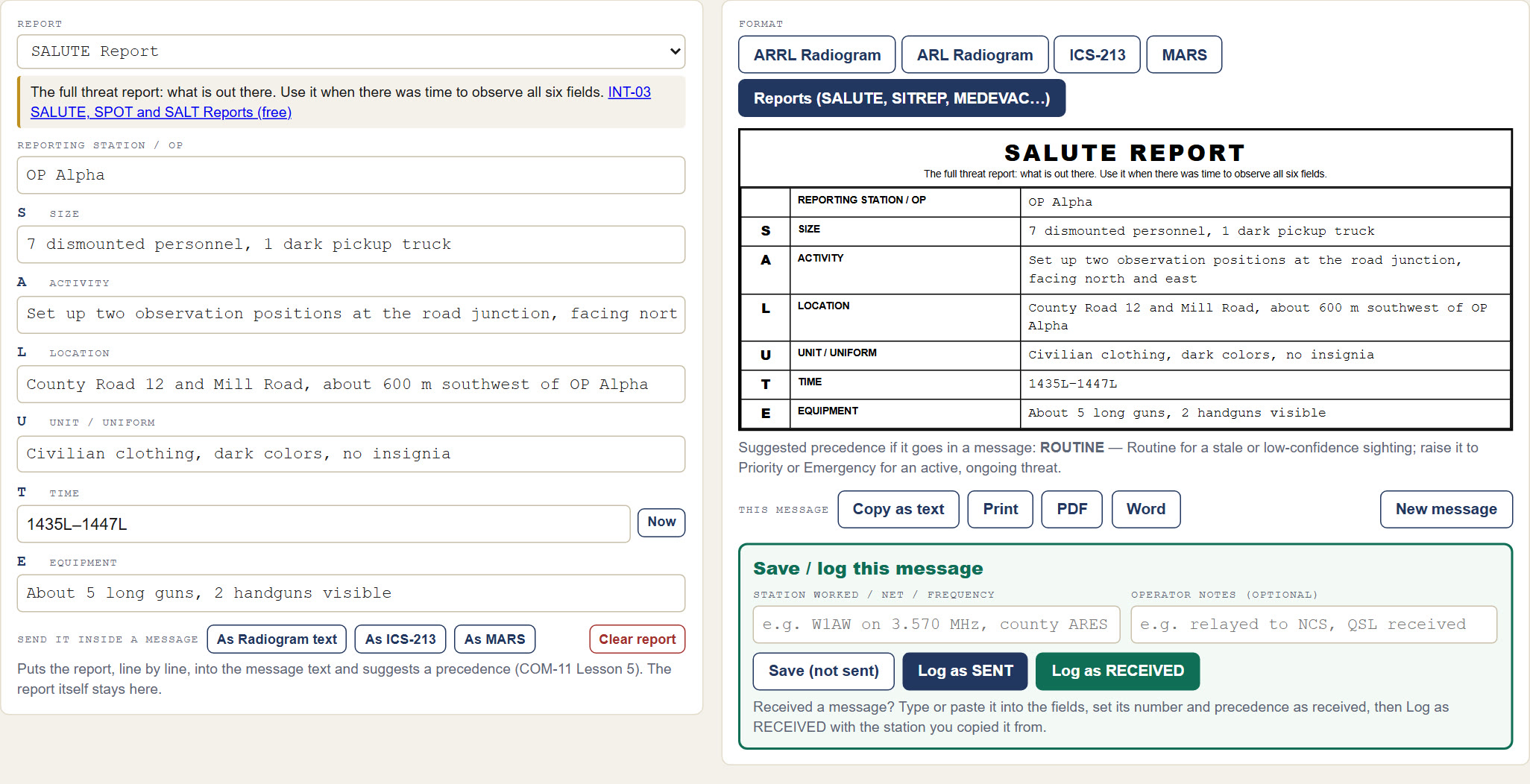
The free Message Formatter & Traffic Log has every report on this page on its Reports tab. Pick one and fill in its lines. Each line has a hint, and each date-time group has a Now button. You can then:
- copy the report as text to read over the air, or print it as a form or PDF;
- send it inside a Radiogram, ICS-213 or MARS message, with the starting precedence suggested;
- log it with the rest of your traffic.
It is one HTML file. It runs in your browser, works offline, and needs no install or account.
Message Formatter & Traffic Log
Free download. No install, no account.
Sources and Training
More on passing messages by radio is in Message Handling & Reporting Formats.
Message HandlingRemember, Fortune Favors the Prepared
Semper Paratus, Semper Gumby