Fortune Favors the Prepared
Home Find a topic Intelligence Today's DTR Training Ready Ledger Ready Trainer The Continuity Chronicles Blog References Shop About Contact
Skip to content

Fortune Favors the Prepared

Semper Paratus, Semper Gumby

Menu
  • The Continuity Chronicles
  • Intelligence Reports
        • DAILY THREAT REPORT
        • DAILY THREAT REPORT – LITE
        • DAILY PREPAREDNESS BRIEF
        • Analytical Standards and Tradecraft
        • Acronym & Abbreviations Glossary
        • Source Registry
        • FLASH & SPECIAL REPORTS
        • Area-Specific Assessment Report
        • SOFT TARGET SECURITY BRIEF
        • THE HOUSEHOLD BRIEF
        • COMMS WATCH
        • FINANCE SECTOR
        • HEALTHCARE SECTOR
        • TRANSPORTATION & LOGISTICS SECTOR
        • AI, DATA CENTER & INFRASTRUCTURE REPORT
        • CONSTRUCTION & MANUFACTURING SECTOR
        • Water and Wastewater Security Report
        • Energy Sector Report
        • Strategic Intelligence Supplement
  • WATCH DESK
  • About
        • The Why
        • Vision and Mission
        • Services
          • Business Resiliency
        • Testimonials
        • Insider
        • Friends
          • Patriot Volunteer Examiner (VE) Team
          • Angery American
          • Signal Stuff
          • Forward Observer
  • Communications
        • Stump Knocker
          • SOI
          • STUMP KNOCKER DMR UPDATES
          • MMDVM Hotspot
        • Preparedness Communications
          • What Radio Should I Get for Preparedness?
            • What Radio to Buy?
              • What Radio to Buy? – video
              • Ham Radio on a Budget
              • Live – What Radio to Buy?
              • Mobile Communications
          • Emergency Communications Principles
          • Communications Options
          • Starter Radio Paths by Preparedness Scenario
          • How Communications Fail
          • HF Communications
            • SHTF HF Communications
            • NVIS in Amateur Radio
        • Amateur (HAM) Radio
          • Why Do I Need a Ham License?
            • How to Obtain Your Amateur Radio License
              • Amateur Radio Learning Resources
              • Finding a Ham Exam
                • HAM Exam Accommodation
            • Are You Expired?
            • Why You Should Upgrade to a General Ham License
          • HAM Simplex Frequency Card
          • Analog versus Digital
          • Analog vs Digital Voice: A Preparedness-Focused Comparison
          • What are CTCSS and DCS
          • Programming Radios with Software
          • ARES, RACES, ACS and AUXCOMM
          • Ham Radio Beyond Line-of-Sight
            • Linked Analog Repeaters
            • EchoLink and IRLP
            • AllStarLink
            • Yaesu System Fusion & WIRES-X
            • D-STAR
            • Digital Mobile Radio (DMR)
            • P25 in Amateur Radio
            • NXDN in Amateur Radio
            • Amateur Radio Satellites (AMSAT)
            • The 60-Meter Band (5 MHz)
          • Meshtastic
          • HAM VoIP
        • Personal Radio Services
          • FCC Rules for Personal Radio Services
          • Family Radio Service (FRS)
          • General Mobile Radio Service (GMRS)
          • Multi-Use Radio Service (MURS)
          • Citizen Band (CB) Radio
            • CB Frequency Card
        • Other Radio Services
          • Communications Continuity Programs and Capabilities
          • Marine Communications
        • Cell Sites and Their Services
          • When Cell Service Fails
          • Radio over LTE and Rapid Radios
            • LTE Radio Comparison
        • Satellite Communications
          • America’s Secret Eyes
          • The Commercial Eye
          • Seeing Through Everything (SAR)
            • Remote Area Emergency Communication Devices
            • Which Beacon Should You Carry?
          • Personal Satellite Communications
        • Wired Communications
          • MAG Phone System
          • TA-312/PT Field Telephone and SB-22/PT Switchboard
          • Understanding Telephone Wiring
          • The AT&T Long Lines Program
        • Communications Planning
          • Communications Plan Annex
            • Communications P.A.C.E.
            • Finding Information for Your Communications Plan
            • Area-Specific Assessment Report
          • Automatic Link Establishment (ALE)
          • Understanding Communications Resiliency
        • Communications Resiliency Programs
          • ARES, RACES and ACS
          • Auxiliary Communications (AUXCOMM)
          • Military Auxiliary Radio System (MARS)
          • U.S. Coast Guard Auxiliary Communications
          • Civil Air Patrol Communications
          • The 60-Meter Band (5 MHz)
            • Understanding the 60-Meter Band
        • Government Communications Continuity Programs
          • Government Emergency Telecommunications Service (GETS) and Wireless Priority Service (WPS)
          • National Warning System (NAWAS)
          • National Interoperable Frequencies
          • The FEMA National Net (FNARS)
          • National Emergency Communications Network (NECN)
          • The SHARES Program
          • State Emergency Capability Using Radio Effectively (Operation SECURE)
          • The High Frequency Global Communications System (HFGCS)
          • Satellite Mutual Aid Radio Talkgroup (SMART)
          • The AT&T Long Lines Program
        • Communications & Emissions Discipline
          • Communications Security (COMSEC)
            • Book Cipher
            • One Time Pads (OTP)
              • Decrypting One Time Pad Message
              • One Time Pads (OTP) Live Video
              • One Time Pad Training
          • Cryptographic Security (CRYPTOSEC)
          • Transmission Security (TRANSEC)
          • Communications Transmission Discipline (TRANSDISC)
          • Emissions Control (EMCON)
          • Communications & Emissions Training Framework
        • DMR Programming
          • DMR Programming – Talk Groups
          • DMR Programming - Roaming
          • MMDVM and Yaesu System Fusion (YSF)
          • Encryption in DMR Radios
        • Digital Mobile Radio (DMR) Networks
          • WR3IRS Interstate DMR Network
            • South Central PA (SC PA)
            • North East PA (NE PA)
            • Washington-Baltimore (W-B)
            • West Central Florida (WCF)
          • Florida Digital Amateur Radio Network (F-DARN)
          • Southeast Florida DMR Repeater Network W2GGI
          • Virginia DMR (DMRVA)
          • NC PRN DMR Network
          • SC Hospital Emergency Amateur Radio Team (SCHEART)
          • HEARS – Hospital Emergency Amateur Radio System
          • New England Digital Emergency Communications Network (NEDECN)
        • Baofeng/BTECH Radios Quick Guide
          • Manually Programming a Baofeng Radio – Video
          • A User’s User Manual for Baofeng Radios
        • MESSAGES & REPORTS
          • Phonetics
          • Procedure Words (Prowords)
          • Date Time Group (DTG)
          • NTS Radiogram Form
            • ARL Numbered Radiograms
          • SALUTE, SPOT, and SALT Reports
          • ACE/LACE Reports
          • GOTWA Report
          • CASREP (Casualty Report) Format
          • MEDEVAC Request Report
          • Formatted Messages (downloads)
        • Communications Knowledge Library
          • Communications Resiliency
          • Radio Etiquette, Jargon, and Best Practices
          • AmRRON RESOURCES & REFERENCES
          • Anytone Programmable Keys
          • Phonetics
          • Amateur Radio Colorado
            • Colorado Linked Repeater Systems
        • COMMUNICATIONS REFERENCES
  • Planning
        • Family Emergency Plan – The Basics
          • Family Emergency Plan
            • Area-Specific Assessment Report
          • Why Every Family Needs an Emergency Plan
        • Family Contingency Binder
          • Family Contingency Binder MindMap
        • Triggers
          • Preparedness Conditions – PREP-CON
            • Preparedness Conditions (PREP-CON) MindMap
          • Space Weather
        • Family Emergency Plan Workbook
          • Family Emergency Plan Workbook - owner resources
            • Area-Specific Assessment Report
            • Family Emergency Planning Form
            • Communications Plan
              • P.A.C.E.
            • Emergency Evacuation
            • Emergency Food Supplies
            • Family Contingency Binder
            • Message Drops
            • Get Home Bag
            • Bug Out Bag & Bins
            • Miscellaneous
        • Household Recovery Workbook
          • Household Recovery Workbook Updates
          • Disaster Debris — What to Do at the Curb
          • Dealing With Grief
        • Next of Kin Workbook
          • Next of Kin Workbook Updates
        • METT-TC: Decision Discipline
          • METT-TC - tactical planning
        • Planning Your Preps
          • Charity in Planning
        • Mutual Assistance Group
          • Mutual Assistance Group Workbook
            • MAG Workbook Forms & Updates
          • Mutual Assistance Groups (MAGs): Skills, Vetting, and Building Real Resilience
          • Mutual Assistance Group (MAG): Recruitment Code of Conduct
          • MAG: Private Vetting & Intake Process
          • Compartmentalization in Mutual Assistance Groups (MAGs)
          • Resiliency Index
          • Continuity of Government & Application to MAGs
  • Threat Assessment
        • Personal Preparedness Assessment Workbook
          • Personal Preparedness Assessment Report
          • Personal Preparedness Assessment Workbook - owner resources
        • Readiness Conditions for Preparedness
          • PREP-CON - Preparedness Conditions
          • COMCON – Communications Readiness Condition
          • WX-CON Weather Conditions
          • SWX-CON Space Weather Condition
          • CONCON – Civilian Continuity Conditions
        • Readiness Conditions – Hierarchy and Relationships
          • LERTCON – Alert Condition
          • DEFCON – Defense Readiness Condition
          • COGCON - Continuity of Government
          • INFOCON – Information Operations Condition
          • FPCON – Force Protection Condition
          • EMERCON – Emergency Condition
          • CYBERCON – Cyber Readiness Conditions
          • CPCON – Cyberspace Protection Condition
          • WATCHCON – Watch Condition
          • SIPRNet – Secret Internet Protocol Router Network
          • REDCON – Readiness Condition
          • NC3CON – Nuclear Command, Control, and Communications
        • Readiness Conditions in The Continuity Chronicles
          • CERCON – Cerberus Readiness Condition
          • COMCON – Communications Readiness Condition
          • C-OPS – CERBERUS Operational Status Conditions
          • CONCON – Civilian Continuity Conditions
        • Being Prepared for Civil Unrest
          • Civil Unrest – Area Intelligence
          • Civil Unrest – Be Prepared
          • Civil Unrest – Defense
          • Civil Unrest – Defense (part 2)
        • Staying Informed Before, During and After Emergencies
          • Weather Awareness
            • Weather Event Codes
            • Weather Radio Comparison
        • Cascade Analysis & Infrastructure
          • Cascade Effects
          • Community Lifelines
          • Area Intelligence
          • Area-Specific Assessment Report
          • National Power Grid
        • Near Earth Object / End of Life Event (ELE)
  • Intelligence
        • ANALYSIS, TRADECRAFT & REPORTING
          • Analytical Standards and Tradecraft
          • Analytical Tradecraft: A Guide to OSINT Analysis
            • OSINT Analysis Study & Reference Guide
          • Understanding Intelligence Analysis Tools
            • Understanding Analysis of Competing Hypotheses (ACH)
            • Understanding MDCOA
            • Understanding OAKOC
        • Operations Security (OPSEC)
          • OPSEC for Teens
          • OPSEC for Kids
          • The Gray Man
          • OPSEC: Don't Become the Target
          • Counterintelligence Tradecraft for the Prepared
        • Community Intelligence
          • Area Intelligence – Now!
            • Area-Specific Assessment Report
          • Community SITREP
          • Radio Traffic Situational Analysis During Emergencies
          • SALUTE, SPOT, and SALT Reports
        • ELECTRONIC THREAT & SURVEILLANCE
          • Staying Informed Before, During and After Emergencies
          • Integrated Public Alert and Warning System (IPAWS)
          • Communications Continuity Programs and Capabilities
          • Short Wave Scanning
          • Seeing Through Everything (SAR)
            • Which Beacon Should You Carry?
          • Wireless Recon Devices
          • Flock Cameras – What You Need to Know
        • The Architecture of Intelligence
        • Intelligence Gathering & Analysis
        • INTELLIGENCE DISCIPLINES
          • Communications Intelligence (COMINT)
          • Electronic Intelligence (ELINT)
          • Tactical Electronic Intelligence (TACELINT)
          • Signals Intelligence (SIGINT) – the basics (2020)
          • Signals Intelligence – Information Gathering Basics (2022)
          • Signals Intelligence (SIGINT)
          • Technical & Infrastructure Intelligence (TECHINT)
          • Electronic Counter-Surveillance
          • Open-Source Intelligence (OSINT)
            • How to Conduct a Daily Threat Analysis Using OSINT
          • Measurement and Signature Intelligence (MASINT)
          • Electronic Surveillance (ES)
          • Overhead Imagery & Geospatial Intelligence (IMINT / GEOINT)
        • INTELLIGENCE REFERENCES
  • Medical
        • Medical Training
          • Patient Assessment & Casualty Management
            • MARCH-PAWS Rapid Assessment
            • DCAP-BTLS – Secondary Trauma Assessment
            • SAMPLE + OPQRST Secondary Assessment
              • Medical History as a Preparedness Skill
            • START Triage
            • MEDEVAC Request Report
            • Patient Assessment – Documentation
              • Patient Care Report Forms
              • CASREP (Casualty Report) Format
        • Medical Kits
          • Individual First Aid Kit (IFAK)
          • BooBoo and IFAK Kits Video
          • BooBoo & IFAK Kit Mind Map
        • Medical Myths
          • Medical Myths – Tampons
          • Medical Myths – Ingested Poisoning
        • MEDICAL REFERENCES
  • Transportation
    • Transportation Plan B
    • Improvised Transportation
    • Winter Vehicle Prep and Kit
  • Animals
    • Preparedness for Pets
  • Food
        • Why You Should Start a Food Storage Plan
        • Food Storage Quick Start
        • Buying in Bulk
        • Inventory Tracking
        • FOOD PRESERVATION RESOURCES
  • Water
    • Water From Air
  • Power
        • Power Grid
        • UPS
        • The Data Center Next Door
  • Bags etc.
        • Bug Out versus Get Home Bags
        • Get Home Bag – Contents
          • Get Home Bag – video
          • Get Home and Bug Out Bags - video from live 2-10
  • Navigation & Signalling
        • Grid Coordinates and Map Reading
        • Map & Compass Land Navigation
        • Practitioners Guide to GPS
          • Quick Instruction Sets
        • Which Emergency Beacon Should You Carry?
        • Covert Signals
        • Emergency Signaling
  • References
        • PLANNING & OPERATIONS
        • SECURITY OPERATIONS
        • INTELLIGENCE
        • CRYPTOLOGY
        • COMMUNICATIONS
        • REPORTING FORMATS
        • GENERAL/MISC
        • MEDICAL
        • FOOD PRESERVATION
        • CRITICAL INFRASTRUCTURE
        • SURVIVAL MANUALS
        • OPSEC
        • COUNTER INSURGENCY & CIVIL DISTURBANCE
        • EMP / CME
        • Training
          • Training Videos
          • One Time Pad (OTP) Exercises
            • 45662
            • 222135ZDEC22
        • Media and Press
  • Blog
    • Boomer
      • Day 1 – The Journey Home
      • Day 2 – First Day in the New Home
      • Day 3 – More Training
      • Day 4 – Dad Goes Back to Work
      • Day 5 – A Day at Home with More Training with Dad (Boomer’s version)
      • Day 6 – More Training with Dad at Home
      • Day 7 – Dad Goes Back to Work, Boring Day
    • Mountain Readiness Fallout Workshops
    • Mapping DMR Repeaters
    • COMMUNICATIONS RESILIENCY
    • Getting The Message Through
    • What are you preparing for?
    • Never Let an Opportunity Go To Waste
    • Cascade Effects and the Perfect Storm
    • DO NOT REPLY
    • Space Weather Warning
    • Good, and Sad, News
    • Necessity vs. Luxury
    • Don’t Put off Until Tomorrow
    • No Plan Survives First Contact
    • Threat and Hazard Identification and Risk Assessment (THIRA)
    • Live – What Radio to Buy?
    • Big Daddy Unlimited Affiliate
    • Food – Tue 16th 7pm MST
    • Live from 2021-2-3
    • Live 2021-01-26
    • FLASH SALE
    • Live 2021-01-11
    • What Is Freedom?
    • Preparedness for Pets
    • What If The Lights Go Out?
    • Hoarding or Prepping?
    • Why Do I Need a Ham License?
    • How Bad is the SolarWinds Orion Issue?
    • How To Begin Prepping
    • Members Only Live Videos
    • Live 11/24
    • Ham Radio VoIP Phone
    • Training Calendar
    • A Chat (with some whisky)
    • Blog 2020 11 02
    • Live with Charlie Hogwood
    • EARTH EX 2020
    • A Live with Angery American
    • Have You Woken Up Yet?
    • BUG OUT READY
    • The Gray Man
    • Area Intelligence – Now!
    • Being Prepared for Civil Unrest
    • It Depends
    • The Art of Being Prepared – The New Prepper
    • Get Home versus Bug Out Bags
    • Why You Need an IFAK AND Training
  • Ready Ledger
        • Ready Ledger Training E01 – Initial Setup
        • Ready Ledger Training Video E02 – Places
        • Ready Ledger Training E03 – People
        • Ready Ledger Training E04 – Containers
        • Ready Ledger Training E05 – Your Spreadsheets
  • Training Curriculum
  • Ready Trainer
  • Shop
  • Contact
    • Mailing List
Menu

Field Report Formats: SALUTE, SITREP, MEDEVAC and More

A field report answers one question, in a fixed order, so the person copying it knows what is coming next. SALUTE says what is out there. A SITREP says how you are doing. ACE/LACE says what you have left. A MEDEVAC asks for a patient to be moved, a CASREP tells command about a casualty, and a GOTWA leaves your plan behind before you move.

This page puts every field report taught on Fortune Favors the Prepared side by side, line by line, with the course that teaches each one. To fill one in, print it, log it or send it inside a Radiogram, use the free Message Formatter & Traffic Log. Its Reports tab has all of them.

On this page

  1. Which Report, When
  2. SALUTE, SPOT and SALT
  3. SITREP
  4. Community SITREP
  5. AmRRON Spot Report and SITREP
  6. ACE/LACE
  7. MEDEVAC Request
  8. CASREP
  9. GOTWA
  10. Getting a Report Onto the Net
  11. Practise With the Message Formatter
  12. Sources and Training

Which Report, When

ReportAnswersUse it whenCourse
SALUTEWhat is out there?You had time to observe all six fieldsINT-03 (free)
SPOTWhat is out there, right now?Speed matters more than detailINT-03 (free)
SALTWhat did I just see?A first-pass report you will expand laterINT-03 (free)
SITREPHow is my element doing?At set intervals, or after anything majorINT-03 (free)
Community SITREPWhat are conditions in the area?After an incident, once reports start arriving from several peoplePLN-03
ACE/LACEWhat have we got left?After contact, at a halt, at every scheduled check-inINT-22
MEDEVACHow do we get this patient to care?Someone needs moving, on a net where both ends know the formatMED-05
CASREPWho is hurt, how badly, and where?Telling command about a casualtyMED-08
GOTWAWhere are you going, and what do we do if you don’t come back?Before anyone leaves a known locationPLN-07

Threat reports and status reports are different families. SALUTE, SPOT and SALT describe the other side. SITREP and ACE/LACE describe your own people. Don’t put your own status in a SALUTE, or a sighting in an ACE/LACE.

SALUTE, SPOT and SALT

These three formats report a sighting. They come from U.S. Army doctrine (FM 6-99, U.S. Army Report and Message Formats, and the infantry and reconnaissance manuals) and are taught in the free INT-03 SALUTE, SPOT and SALT Reports course. Report what you saw, not what you think it means.

SALUTE: the full threat report

LineFieldWhat goes in itExample (invented)
SSizeA count, or a bounded estimate7 dismounted personnel, 1 dark pickup truck
AActivityWhat they are doing: direction, speedSet up two observation positions at the road junction, facing north and east
LLocationGrid, address, or bearing and distance from a known pointCounty Road 12 and Mill Road, about 600 m southwest of OP Alpha
UUnit / UniformClothing, markings, insignia, or UNKNOWNCivilian clothing, dark colors, no insignia
TTimeWhen observed, with the time zone1435L to 1447L
EEquipmentWeapons, vehicles, gearAbout 5 long guns, 2 handguns visible

SPOT: the fastest threat report

LineFieldWhat goes in it
SSizeCount or estimate
PPositionBearing and distance from a known point, or a grid
OObserved timeWhen you saw it, and whether it is still there
TType of activity / threatWhat they are doing and how threatening it is

SALT: the first-pass report

Size, Activity, Location, Time. It is SALUTE without Unit and Equipment. Send it fast, then upgrade it to a SALUTE as you learn more.

Read more: SALUTE, SPOT, and SALT Reports.

SITREP

A SITREP is your own element’s status, sent at set intervals or after a major event. This is the nine-line layout taught in INT-03 and used across this site. Some unit SOPs add lines such as Attachments and Weather; here those go in Remarks.

LineFieldWhat goes in it
1DTGWhen the report is sent, e.g. 221400LJUN26
2As ofThe time the information is current
3Unit / elementWho is reporting, e.g. Patrol Team Bravo
4ActivityWhat you did, or are doing, this period
5Enemy / threatNEGATIVE, or a summary that points to the SALUTEs you filed
6FriendlyYour people present and operational
7Logisticse.g. Water AMBER, about 6 hours for 2 personnel
8PersonnelHeadcount, injuries, casualties
9RemarksRequests, patterns, and your interpretation

Short on time? A minimum SITREP is DTG, Unit, Enemy, Personnel (headcount only) and a one-line Logistics status.

Community SITREP

A Community SITREP reports conditions after an incident, not a single event. It fuses what several people saw into one picture a decision-maker can act on. It is taught in PLN-03 Community SITREP, and the blank form is on Formatted Messages: downloads.

LinesBlockFields
1–8Header1 To · 2 From · 3 Precedence · 4 Current DTG (YYYYMMDD-HHMMZ, UTC) · 5 Incident # · 6 Operational period · 7 Expiration · 8 Location
9–14Incident status9 Incident status (what happened, in one line) · 10 Size and scope · 11 Overall hazard · 12 Current weather · 13 24 hr weather · 14 48 hr weather
15–22Community Lifelines15 Safety & Security · 16 Food, Hydration, Shelter · 17 Health & Medical · 18 Energy · 19 Communications · 20 Transportation · 21 Hazardous Materials · 22 Water Systems

Each Lifeline gets its components (in the Message Formatter you tick them from FEMA’s list for that Lifeline), a status (Green / OK, Yellow / Problems, Red / Down), a trend (Better, Same, Worse) and an ETA to green. Status and trend are separate. A Lifeline can be Down and getting Better at the same time, so report both.

Report what was observed, not what could happen. “I smell gas at the corner of 4th and Elm” is a SITREP line. “There could be a gas leak” belongs in a hazard assessment. Open sources such as outage maps add context in the remarks; they never override someone who was there.

AmRRON Spot Report and SITREP

AmRRON publishes its own versions of both reports with numbered lines and a message header. The forms are linked on Formatted Messages: downloads.

FormLines
AmRRON Spot Report (AFR-100)1 To · 2 From · 3 Precedence · 4 Current DTG · 5 Size · 6 Activity · 7 Location · 8 Unit · 9 Time & duration · 10 Equipment · 11 Narrative: who, what, where, when, why, how many
AmRRON SITREP (AFR-110)1 To · 2 From · 3 Precedence · 4 Current DTG · 5 Incident number · 6 Expiration · 7 Location · 8 Incident status (New, Ongoing, Resolved) · 9 Size and scope (Local, Regional, National) · 10–16 Overall hazard, Current weather, 48 hr weather, Infrastructure, Political, Civil, Communications, each Green, Yellow or Red · 17 Remarks, including your source

ACE/LACE

ACE/LACE reports your own status after contact, at a halt or at a scheduled check-in: Liquid, Ammunition, Casualty, Equipment. ACE drops the Liquid slot. It is taught in INT-22 ACE/LACE Squad Readiness Reporting.

ColorMeaning (against a written baseline)
GreenFully capable, about 80–100% of the baseline. Continue.
AmberManageable, but watch it. Say the trend: “Amber on water, down from Green in four hours.”
RedSevere. Act now.
BlackBelow about 40%, or unable to do the task. Stop or hand it off.
  • Every slot, every time. “Green, Green, Green, Green” is a real report. A slot left out means nobody checked it.
  • A color per system, never an average. “Black on 5.56, Green on 12-gauge.”
  • Report the outlier. “Team Amber on water, one individual Black.”
  • Compact form for routine check-ins: “Bravo Two: Amber, Amber, Green, Red.” Use the full form, with the detail, after any incident or whenever a slot is Red or Black.

MEDEVAC Request

The numbered request is for a radio net where both ends know the format, such as your MAG’s medical coordinator. To 911 or a SAR base, say the same things in plain language, and let the dispatcher decide what to send. It is taught in MED-05 MEDEVAC Request.

LineFieldWhat goes in it
1Date-time groupIn Zulu, e.g. 091430ZSEP26
2UnitYour MAG name or call sign
3LocationGrid coordinate of the pickup site
4Radio frequencyFrequency, call sign and suffix used at the pickup site
5Patients by precedenceA Urgent · B Urgent-Surgical · C Priority · D Routine · E Convenience, with counts and BREAK between: A2 BREAK D1
6Special equipmentA None · B Hoist · C Extraction equipment
7Patients by typeL litter · A ambulatory, with counts: L1 A1
8Security of pickup siteN none · P possible, approach with caution · E confirmed, approach with caution · X armed escort required
9Nature of wound, injury or illnessSpecific: “closed fracture, right lower leg, patient stable”
10Method of markingA Panels · B Pyrotechnic · C Smoke · D None · E Other
11Patient nationality / categoryNot applicable, or MAG member / non-member

Why 11 lines in a “9-line”? MED-05 follows FM 101-5-2, which puts the date-time group and unit on lines 1 and 2. Lines 3–11 are the familiar nine lines, so its line 3 (location) is line 1 on many military 9-line cards. Every page on this site uses the MED-05 numbering; agree on one numbering within your group. The MEDEVAC Request Report page has a quick card, plus what to say if you call 911 instead.

CASREP

A CASREP gives command a snapshot of a casualty: ten fields, always in the same order. It is not a request. If the casualty needs moving, that is a separate MEDEVAC message. It is taught in MED-08 CASREP: Casualty Reporting.

LineFieldWhat goes in it
1Date / timeWhen the report is made
2Reporting stationWho is sending it
3LocationWhere the casualty is
4Number of casualtiesHow many
5Casualty statusTriage words: Immediate, Delayed, Minor
6Nature of injury / illnessWhat you can see, not a diagnosis: “deformity visible, casualty reports pain”
7Current careWhat is being done, in one line
8Receiving stationWho the report is going to
9MEDEVAC flagYes or No only
10AuthenticationPer your MAG’s SOP

GOTWA

GOTWA is the plan you leave behind before you move. It is taught in PLN-07 GOTWA Report, and a printable form is on Formatted Messages: downloads.

LineFieldWhat goes in it
GGoingWhere, by which route, past which landmarks
OOthersWho is with you, or SOLO
TTimeWhen you leave, when you will be back, and any check-ins, with the time zone
WWhatWhat you are doing
AActionsIf you are not back or in contact by a set time: who they call, in what order, and what they tell them

Add your name or call sign, the date and time, and a primary and secondary contact.

Getting a Report Onto the Net

None of these reports is a radio message on its own. To pass one over NTS or a MAG net, put it in the Text of a Radiogram (or an ICS-213 or MARS message) and keep the report’s own lines. COM-11 Message Formats, Lesson 5, sets the starting precedence:

ReportStarting pointWhat pushes it higher
SALUTE / SPOTRoutine for a stale or low-confidence sightingAn active, ongoing threat: Priority or Emergency
ACE/LACERoutine: it is status, not a requestA Black slot on something mission-essential: Priority or higher
MEDEVACTypically Priority or EmergencyThe evacuation category decides which
CASREPSet by casualty statusImmediate status: typically Priority or Emergency
Community SITREPRoutineA specific finding that meets the bar for something higher

A report usually runs past a Radiogram’s 25-word guideline. That is expected: keep its structure rather than squeezing it. See Radiogram, ICS-213 and MARS Message Formats for the message side.

Practise With the Message Formatter
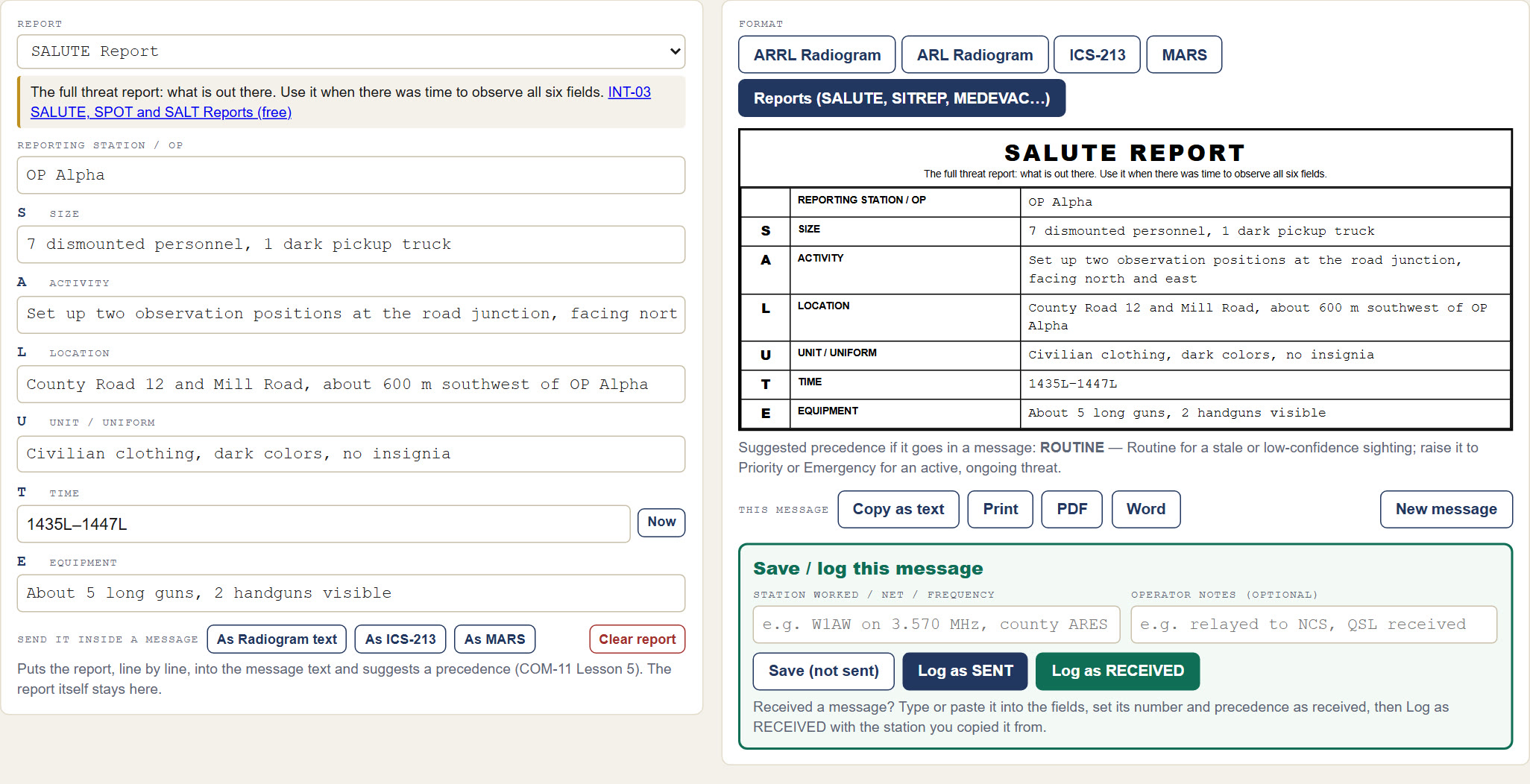
The Message Formatter Reports tab: a SALUTE report being filled in on the left and the finished form on the right
The Reports tab, with a SALUTE report (invented example).

The free Message Formatter & Traffic Log has every report on this page on its Reports tab. Pick one and fill in its lines. Each line has a hint, and each date-time group has a Now button. You can then:

  • copy the report as text to read over the air, or print it as a form or PDF;
  • send it inside a Radiogram, ICS-213 or MARS message, with the starting precedence suggested;
  • log it with the rest of your traffic.

It is one HTML file. It runs in your browser, works offline, and needs no install or account.

Message Formatter & Traffic Log
Free download. No install, no account.

Get the tool

Sources and Training

  • INT-03 SALUTE, SPOT, and SALT Reports (free course): SALUTE, SPOT, SALT and the SITREP
  • INT-22 ACE/LACE Squad Readiness Reporting
  • PLN-03 Community SITREP
  • PLN-07 GOTWA Report
  • MED-05 MEDEVAC Request
  • MED-08 CASREP: Casualty Reporting
  • COM-11 Message Formats: getting reports onto the net
  • Formatted Messages: downloads: blank forms, including the AmRRON Spot Report and SITREP
  • Reporting Formats: the Army field manuals behind these reports, including FM 6-99

More on passing messages by radio is in Message Handling & Reporting Formats.

Message Handling

Remember, Fortune Favors the Prepared

Semper Paratus, Semper Gumby

Start here

  • Where to start
  • What to prepare for
  • The Preparedness Pillars
  • Workbooks
  • Communications
  • Training courses

Free guides & tools

  • Where to Start Being PreparedPDF
  • THIRA for Your HouseholdPDF
  • What to Get to Start Your CommsPDF
  • POC Radios and Your PACE PlanPDF
  • Start a Food Storage PlanPDF
  • Winter Vehicle KitPDF
  • Message FormatterFREE TOOL
  • Field Report Formats

The Continuity Chronicles

  • The Meadow ProtocolBook 1
  • The BrushBook 2
  • Unassigned AuthorityBook 3
  • About the series
  • Shadow Government LeakA leaked file from the books
  • All three books bundle

Shop

  • Family Emergency Plan WorkbookMost popular
  • Personal Preparedness Assessment Workbook
  • Communications Card Bundle13 field cards
  • All workbooks
  • Area assessments (ASAR)
  • The Continuity Chronicles books
  • Ready Ledger
Visit the shop →

Search the site

Login with Patreon

Login with Patreon

Cart

About FFTP

  • Support us on Patreon
  • About
  • Contact
©2026 Fortune Favors the Prepared | Built using WordPress and Responsive Blogily theme by Superb