Signing, CSCE & Session Close-out
Applicant and VE signing, issuing the CSCE, post-session debrief, and what the Team Leader needs to complete the upload.
Workflow document note: The Hybrid Exam Workflow document is the primary reference for the export-from-ExamTools and session manager import process. This lesson covers the close-out steps completed during the session. Post-session file handling by the TL/DTL is covered in VEC-04.
Lesson Objectives
- Walk computer and paper exam applicants through electronic signing
- Sign in the correct VE order
- Complete and email the CSCE — even when printing
- Provide felony instructions correctly without offering FCC opinions
- Conduct the post-session debrief and flag pending application issues
Computer exam applicants
Once an applicant has completed all exams they wish to take:
- Instruct: “Finish and Sign” — tell the applicant to select that option in ExamTools
- Help the applicant verify all their information is correct. Viewing the 605 form is recommended as it shows all fields at once
- Applicant types their name and signs in the signature box. The “Finish and Complete” button does not turn green until the signature box has a sufficient signature
- Once signed, the applicant logs off and shuts down their device. Give them CSCE delivery instructions at this point
Paper exam applicants
After passing at least one element on paper and completing all testing:
- Use the applicant status drop-down in ExamTools to set status to READY TO SIGN
- Provide the applicant a team device or allow them to use their smartphone to log into the ExamTools session
- Authorize them into the session — their screen will go directly to the signing page. Follow the same computer exam signing steps

VE signatures
Once the applicant has signed, VEs sign in whatever order the team prefers — ExamTools does not require or enforce any particular signing order.
Recommended: the Session Leader signs last. This is a team preference, not an ExamTools requirement. Signing last keeps the Session Leader aware of who has completed their exams, and reminds them of their own responsibility to email the CSCE.
Issuing the CSCE
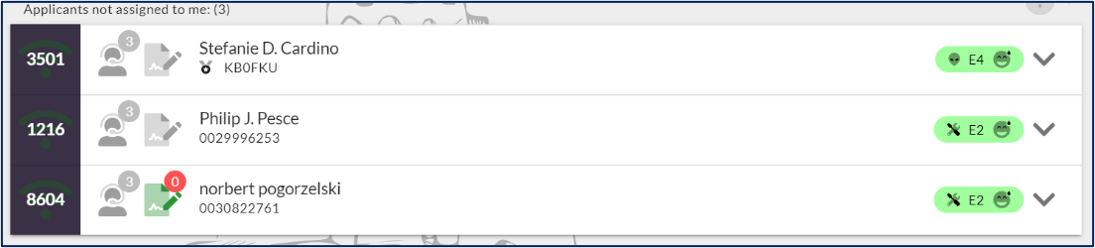
Always email the CSCE from ET — even when printing. The email action is recorded in ExamTools, creating auditable proof that the applicant received their CSCE. Printing only, without emailing, leaves no record. Hybrid Exam Workflow Sec. L.3 and P&P App. 8 Sub-task 12-1.
- Print the CSCE for the applicant (if applicable)
- Change the applicant’s status to COMPLETED — the applicant bar turns green
- Email the CSCE from ExamTools. The printer icon shows 0 until emailed, then shows the send count
Felony instructions
If the applicant answered YES to the felony question and has passed, provide the Laurel VEC “Instructions for Filing a Felony Conviction Explanation” sheet. No VE may offer any opinion on what the FCC may or may not do.
Session paperwork to scan
- All paper answer sheets — including the back if used for notes or scratch calculations
- Any other note paper used by applicants
- Documents used for element credit (copies retained per VEC-01 Lesson 3)
- Any other pertinent documents
Pending applications: If any applicant has a pending FCC application, the Team Leader must be notified no later than when session documents are uploaded to the portal. The TL will determine whether to hold that applicant’s file.
Post-session debrief
The Session Leader conducts a short debrief with the VE team covering: what worked well, what could be improved, and any issues to report. session reports recommendations to the Team Leader within 24 hours. Ensure the facility is clean and restored to its original condition.
What happens next: TL/DTL post-session duties
The Team Leader or designated DTL takes the scanned session paperwork and handles the export from ExamTools, import into Laurel session manager, and upload to the Laurel VEC portal. This workflow is covered in VEC-04: Post-Session Upload for Team Leaders.
References: ExamTools Documentation • Laurel VEC P&P
VEC-03 Complete!
You have completed ExamTools Operations training for Laurel VEC.
| ← Lesson 5 |