VE Admin: The Step-Up Role
What VE Administrator authority means in practice, what VE Admins handle independently, and where they must coordinate with the Session Leader.
Team-specific training requirement: VE Admin is an ExamTools access level that requires additional team-level training before it is assigned. PVET requires specific VE Admin training before a member takes on this role. Confirm your team’s requirement with your Team Leader before accepting a VE Administrator assignment.
Lesson Objectives
- Distinguish what VE Admins handle independently from what requires Session Leader coordination
- Apply element credit correctly as a VE Administrator, including the required coordination step
- Set applicant statuses correctly at check-in and at the signing stage
- Recognize the limits of VE Administrator authority within an ExamTools session
Beyond standard VE access
VE Admins hold elevated access within ExamTools. This role is typically assigned to the VEs handling check-in. VE Administrator authority exists to keep the check-in process moving without requiring Session Leader involvement for every applicant record update.
| VE Admins CAN do independently | VE Admins CANNOT do |
|---|---|
| Edit applicant information (add/correct phone numbers, email, address) | Start or finalize the session (Owner and Co-Owner only) |
| Change applicant status (SEEN, READY TO SIGN) | Create the ExamTools session |
| Assign VEs to applicants | Override Session Leader decisions |
| Manage applicant queue during check-in | Apply element credit without Session Leader coordination — ExamTools does not technically block this, but best practice requires informing the Session Leader first |
| Verify registration information and correct errors | Act on felony disclosures independently — escalate to Session Leader |
| Void a candidate’s exam (use only with Session Leader direction) | Add or change VE permissions within the session (Owner and Co-Owner only) |
| Evict a candidate from the session (use only with Session Leader direction) | Finalize candidates or finalize the session (Owner and Co-Owner only) |
Your primary responsibility during check-in
VE Admins own the check-in workflow. While standard VEs monitor applicants during testing, VE Admins focus on moving applicants through all six check-in steps efficiently and accurately.
- Verify and correct registration information directly in ExamTools without escalating for minor corrections (missing phone, address update)
- Ask about pending FCC applications and pass specifics immediately to the Session Leader — this is an escalation point, not a VE Administrator decision
- Confirm felony disclosures using the correct script (confirm YES was intentional, advise they will receive instructions if they pass) — do not offer opinions; escalate any unusual situations to the Session Leader
- Verify element credit documentation and coordinate with the Session Leader for credit entry in ExamTools — do not apply credit without confirming who is handling it
- Set status to SEEN once all six steps are complete — this is your primary system action at check-in
What if a registration error is caught after signing, not before? Correcting registration information (name, FRN, address, etc.) is straightforward during check-in, before anything is signed. But if an error is discovered after the CSCE and Form 605 are already signed, going into “edit” to fix it will unsign the record. The applicant and the VEs will need to sign again, and a new CSCE must be emailed.
Why element credit requires coordination
VE Administrator access allows entry of element credit in ExamTools. However, applying element credit is a consequential action — if applied to the wrong element or applied twice, it creates a record error that is difficult to correct after upload.
The correct process:
- VE Admin verifies the credit documentation is valid (correct VEC, within 365 days, signed by three VEs, correct element)
- VE Admin informs the Session Leader what credit is being claimed and shows the documentation
- Session Leader confirms who will enter it in ExamTools (may be the VE Administrator or the Session Leader, depending on the team’s preference)
- Credit is entered before the applicant begins their first element
- Both the VE Administrator and Session Leader confirm the entry is correct before the applicant proceeds
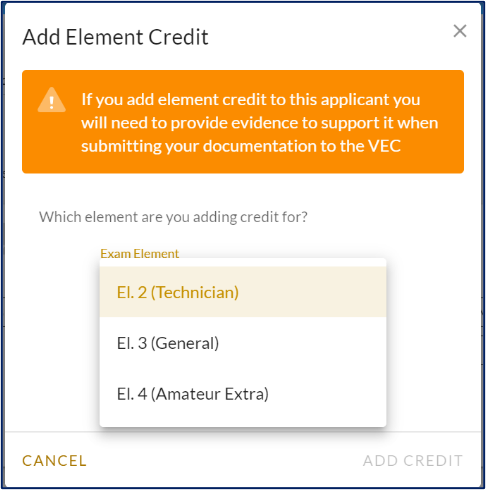
Element credit applied after testing begins is not acceptable. The coordination step exists precisely to ensure this doesn’t happen. P&P and VEC-01 Lesson 3 govern what credit is valid and what proof is required.


Setting READY TO SIGN for paper exam applicants
When a paper exam applicant has passed at least one element and is ready to proceed to signing, the VE Administrator (or assigned VE) sets the status to READY TO SIGN in the applicant menu. This status change initiates the ExamTools signing workflow, allowing the applicant to log in on a device and sign electronically.
Do not set COMPLETED at this stage — that status is applied after the CSCE has been issued.
References: ExamTools Role Permissions • Laurel VEC P&P
| ← Lesson 2 |