Ready Cipher · Instructions
How to send and read a one-time pad message with Ready Cipher, step by step. Not downloaded it yet? Get it free on the Ready Cipher page.
On this page
Open Ready Cipher
- Unzip the downloadPut the folder somewhere you will find it again, such as your documents folder or a USB stick in your go-kit.
- Double-click Ready_Cipher.htmlIt opens in Chrome, Edge or Firefox and works without an internet connection.
- Nothing is savedEverything you type stays in the page and is gone when you close or reload it. Print anything you need to keep.
Practise with a Training Pad
- Open Training padsPick a TREE series pad, such as Birch, and press Use this pad. It loads on the Encrypt and Decrypt pages with a red TRAINING PAD LOADED bar.
- Or make a practice sheetChoose 250 or 500 digits per pad and press Make a training sheet. Print two copies, one for you and one for your partner, and destroy them after the exercise.
- Try an exampleOn Encrypt, Try an example loads a sample message and the Birch pad so you can see a finished worksheet straight away.
Send a Message
- Agree pads in advanceYou and the receiver each hold an identical pad. The first five digits of every pad are its key indicator, the name of that pad.
- Type the messageOn Encrypt, write it short and plain. Leave out words you don’t need: every character uses pad digits.
- Paste the padPaste the pad digits, key indicator first. Spaces and dashes are ignored.
- Check the worksheetEach block shows PLAIN (the message as numbers), PAD (your pad) and SEND (the pad subtracted digit by digit, with no borrowing).
- Send the groupsSend the groups in the green box, five to a line. The first group is the key indicator, sent in the clear so the receiver finds the right pad. Use Copy groups or Print message form. Ready Cipher prints a plain message sheet. To put the groups on an ARRL Radiogram, ARL Radiogram, ICS-213 or MARS form, paste them into Ready Messenger, our free message formatter, and choose the format there.
- Check, then destroyCheck it decrypts runs the groups back through Decrypt. Then destroy the pad: never use it again.
Here is the worked example from Ready Cipher, the message MEET AT NORTH GATE 1900 on the TREE Birch training pad (key indicator 27807):
Take the first digit: 7 minus 8 with no borrowing is 17 minus 8, which is 9.
Read a Message
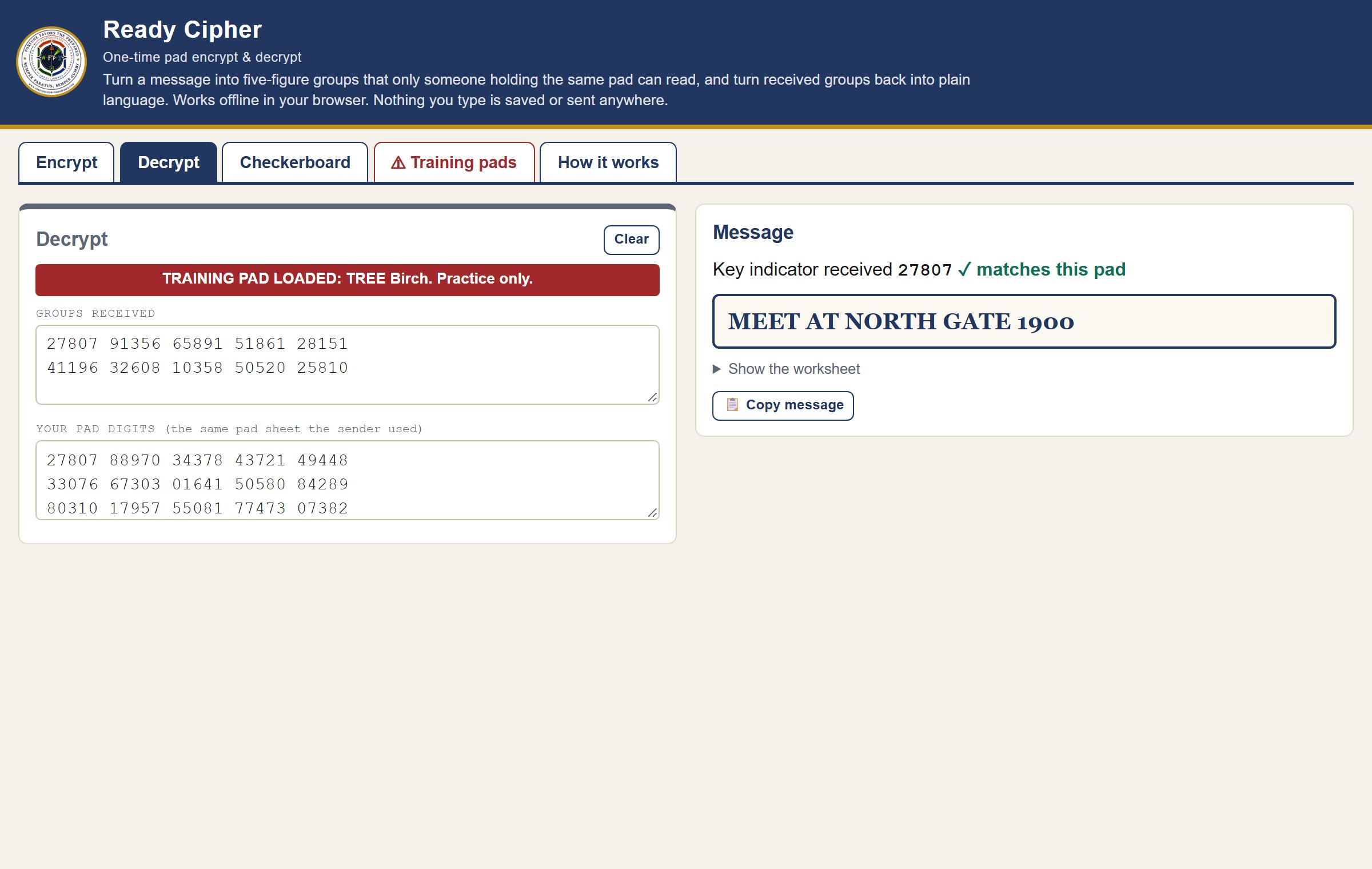
- Find the padFind the pad whose key indicator matches the first group you received.
- Paste the groups and the padOn Decrypt, paste what you received and the pad digits. The pad is added digit by digit with no carrying.
- Check the key indicatorA green tick means the groups and your pad match. A red cross means you have the wrong pad.
- Read the message, then destroy the padShow the worksheet shows the RCVD, PAD and PLAIN rows if you want to check by hand.
How the Checkerboard Works
Before the pad is applied, each letter becomes a number. The six most used letters get one digit and everything else gets two, which keeps messages short.
| 1 digit | A 1 | E 2 | I 3 | N 4 | O 5 | T 6 | ||||
|---|---|---|---|---|---|---|---|---|---|---|
| 7_ | B 70 | C 71 | D 72 | F 73 | G 74 | H 75 | J 76 | K 77 | L 78 | M 79 |
| 8_ | P 80 | Q 81 | R 82 | S 83 | U 84 | V 85 | W 86 | X 87 | Y 88 | Z 89 |
| 9_ | FIG 90 | . 91 | : 92 | ‘ 93 | — | + 95 | – 96 | = 97 | ? 98 | space 99 |
- Numbers go between two 90s, with each digit written three times: 19 becomes 90 111 999 90.
- Space is 99, and the last group is filled with 9s to make five digits.
- 0 means CODE in Ready Ledger, where a brevity code follows. Ready Cipher never sends one, and if it receives one it tells you the message came from Ready Ledger.
When Something Looks Wrong
- A ▉ block mark in the message: a group was miscopied. Check it against what was received, or ask for that group again.
- “Does not match this pad”: the key indicator is different, so you have the wrong pad.
- “Pad too short”: the message needs more pad digits than the pad has. Shorten the message or split it over two pads. Never stretch or reuse a pad.
- “Skipped (not on the checkerboard)”: characters like ! or @ can’t be sent. Write them out or leave them out.
- [BREVITY CODE] in the message: it was sent from Ready Ledger with brevity codes, which need Ready Ledger’s codebook.
Good Habits
- One pad, one message. Reusing a pad is the classic way one-time pad traffic gets broken.
- Pads must be truly random. Use ten-sided dice or a trusted hardware source. A pattern you made up is not random.
- Guard the pads. Anyone with a copy can read the traffic. Keep sheets locked up and burn used ones.
- Learn on paper too. The worksheet shows the same rows you would write by hand, so check a few groups yourself.
Know the radio rules
FCC rules for amateur radio (Part 97) and for GMRS and FRS (Part 95) do not allow messages encoded to hide their meaning, apart from narrow exceptions. A one-time pad message is for paper, a courier, or a service that allows it. Check the rules where you are before you send anything.
Want shorter messages? Ready Ledger adds a brevity codebook that sends common words as one code, plus DRYAD sheets, codewords and an incident message log.
Remember, Fortune Favors the Prepared
Semper Paratus, Semper Gumby