Skip to content

Fortune Favors the Prepared

Semper Paratus, Semper Gumby

Menu
  • The Continuity Chronicles
  • Intelligence Reports
        • DAILY THREAT REPORT
        • DAILY THREAT REPORT – LITE
        • DAILY PREPAREDNESS BRIEF
        • Analytical Standards and Tradecraft
        • Acronym & Abbreviations Glossary
        • Source Registry
        • FLASH & SPECIAL REPORTS
        • Area-Specific Assessment Report
        • SOFT TARGET SECURITY BRIEF
        • THE HOUSEHOLD BRIEF
        • COMMS WATCH
        • FINANCE SECTOR
        • HEALTHCARE SECTOR
        • TRANSPORTATION & LOGISTICS SECTOR
        • AI, DATA CENTER & INFRASTRUCTURE REPORT
        • CONSTRUCTION & MANUFACTURING SECTOR
        • Water and Wastewater Security Report
        • Energy Sector Report
        • Strategic Intelligence Supplement
  • WATCH DESK
  • About
        • The Why
        • Vision and Mission
        • Services
          • Business Resiliency
        • Testimonials
        • Insider
        • Friends
          • Patriot Volunteer Examiner (VE) Team
          • Angery American
          • Signal Stuff
          • Forward Observer
  • Communications
        • Stump Knocker
          • SOI
          • STUMP KNOCKER DMR UPDATES
          • MMDVM Hotspot
        • Preparedness Communications
          • What Radio Should I Get for Preparedness?
            • What Radio to Buy?
              • What Radio to Buy? – video
              • Ham Radio on a Budget
              • Live – What Radio to Buy?
              • Portable Radio Kit
              • Mobile Communications
          • Emergency Communications Principles
          • Communications Options
          • Starter Radio Paths by Preparedness Scenario
          • How Communications Fail
          • HF Communications
            • SHTF HF Communications
            • Simple Antenna Builds for HF – video
            • NVIS in Amateur Radio
        • Amateur (HAM) Radio
          • Why Do I Need a Ham License?
            • How to Obtain Your Amateur Radio License
              • Amateur Radio Learning Resources
              • Finding a Ham Exam
                • HAM Exam Accommodation
              • Getting Into Ham Radio – Video
            • Are You Expired?
            • Why You Should Upgrade to a General Ham License
          • HAM Simplex Frequency Card
          • Analog versus Digital
          • Analog vs Digital Voice: A Preparedness-Focused Comparison
          • What are CTCSS and DCS
          • Programming Radios with Software
          • ARES, RACES, ACS and AUXCOMM
          • Ham Radio Beyond Line-of-Sight
            • Linked Analog Repeaters
            • EchoLink and IRLP
            • AllStarLink
            • Yaesu System Fusion & WIRES-X
            • D-STAR
            • Digital Mobile Radio (DMR)
            • P25 in Amateur Radio
            • NXDN in Amateur Radio
            • Amateur Radio Satellites (AMSAT)
            • The 60-Meter Band (5 MHz)
          • Meshtastic
          • HAM VoIP
        • Personal Radio Services
          • FCC Rules for Personal Radio Services
          • Family Radio Service (FRS)
          • General Mobile Radio Service (GMRS)
            • GMRS Repeaters
            • Getting a GMRS License
            • FRS / GMRS / MURS Frequency Card
          • Multi-Use Radio Service (MURS)
          • Citizen Band (CB) Radio
            • CB Frequency Card
        • Other Radio Services
          • Communications Continuity Programs and Capabilities
          • Marine Communications
        • Cell Sites and Their Services
          • When Cell Service Fails
          • Radio over LTE and Rapid Radios
            • LTE Radio Comparison
        • Satellite Communications
          • America’s Secret Eyes
          • The Commercial Eye
          • Seeing Through Everything (SAR)
            • Remote Area Emergency Communication Devices
            • Which Beacon Should You Carry?
          • Personal Satellite Communications
        • Wired Communications
          • MAG Phone System
          • TA-312/PT Field Telephone and SB-22/PT Switchboard
          • Understanding Telephone Wiring
          • The AT&T Long Lines Program
        • Communications Planning
          • Communications Plan Annex
            • Communications P.A.C.E.
            • Finding Information for Your Communications Plan
            • Area-Specific Assessment Report
          • Automatic Link Establishment (ALE)
          • Understanding Communications Resiliency
        • Communications Resiliency Programs
          • ARES, RACES and ACS
          • Auxiliary Communications (AUXCOMM)
          • Military Auxiliary Radio System (MARS)
          • U.S. Coast Guard Auxiliary Communications
          • Civil Air Patrol Communications
          • The 60-Meter Band (5 MHz)
            • Understanding the 60-Meter Band
        • Government Communications Continuity Programs
          • Government Emergency Telecommunications Service (GETS) and Wireless Priority Service (WPS)
          • National Warning System (NAWAS)
          • National Interoperable Frequencies
          • The FEMA National Net (FNARS)
          • National Emergency Communications Network (NECN)
          • The SHARES Program
          • State Emergency Capability Using Radio Effectively (Operation SECURE)
          • The High Frequency Global Communications System (HFGCS)
          • Satellite Mutual Aid Radio Talkgroup (SMART)
          • The AT&T Long Lines Program
        • Communications & Emissions Discipline
          • Communications Security (COMSEC)
            • Book Cipher
            • One Time Pads (OTP)
              • Decrypting One Time Pad Message
              • One Time Pads (OTP) Live Video
              • One Time Pad Training
          • Cryptographic Security (CRYPTOSEC)
          • Transmission Security (TRANSEC)
          • Communications Transmission Discipline (TRANSDISC)
          • Emissions Control (EMCON)
          • Communications & Emissions Training Framework
        • DMR Programming
          • DMR Programming – Talk Groups
          • DMR Programming - Roaming
          • MMDVM and Yaesu System Fusion (YSF)
          • Encryption in DMR Radios
        • Digital Mobile Radio (DMR) Networks
          • WR3IRS Interstate DMR Network
            • South Central PA (SC PA)
            • North East PA (NE PA)
            • Washington-Baltimore (W-B)
            • West Central Florida (WCF)
          • Florida Digital Amateur Radio Network (F-DARN)
          • Southeast Florida DMR Repeater Network W2GGI
          • Virginia DMR (DMRVA)
          • NC PRN DMR Network
          • SC Hospital Emergency Amateur Radio Team (SCHEART)
          • HEARS – Hospital Emergency Amateur Radio System
          • New England Digital Emergency Communications Network (NEDECN)
        • Baofeng/BTECH Radios Quick Guide
          • Manually Programming a Baofeng Radio – Video
          • A User’s User Manual for Baofeng Radios
        • MESSAGES & REPORTS
          • Phonetics
          • Procedure Words (Prowords)
          • Date Time Group (DTG)
          • NTS Radiogram Form
            • ARL Numbered Radiograms
          • SALUTE, SPOT, and SALT Reports
          • ACE/LACE Reports
          • GOTWA Report
          • CASREP (Casualty Report) Format
          • MEDEVAC Request Report
          • Formatted Messages (downloads)
        • Communications Knowledge Library
          • Communications Resiliency
          • Radio Etiquette, Jargon, and Best Practices
          • AmRRON RESOURCES & REFERENCES
          • Anytone Programmable Keys
          • Phonetics
          • Amateur Radio Colorado
            • Colorado Linked Repeater Systems
        • COMMUNICATIONS REFERENCES
  • Planning
        • Family Emergency Plan – The Basics
          • Family Emergency Plan
            • Area-Specific Assessment Report
          • Why Every Family Needs an Emergency Plan
        • Family Contingency Binder
          • Family Contingency Binder MindMap
        • Triggers
          • Preparedness Conditions – PREP-CON
            • Preparedness Conditions (PREP-CON) MindMap
          • Space Weather
        • Family Emergency Plan Workbook
          • Family Emergency Plan Workbook - owner resources
            • Area-Specific Assessment Report
            • Family Emergency Planning Form
            • Communications Plan
              • P.A.C.E.
            • Emergency Evacuation
            • Emergency Food Supplies
            • Family Contingency Binder
            • Message Drops
            • Get Home Bag
            • Bug Out Bag & Bins
            • Miscellaneous
        • Household Recovery Workbook
          • Household Recovery Workbook Updates
          • Disaster Debris — What to Do at the Curb
          • Dealing With Grief
        • Next of Kin Workbook
          • Next of Kin Workbook Updates
        • METT-TC: Decision Discipline
          • METT-TC - tactical planning
        • Planning Your Preps
          • Charity in Planning
        • Mutual Assistance Group
          • Mutual Assistance Group Workbook
            • MAG Workbook Forms & Updates
          • Mutual Assistance Groups (MAGs): Skills, Vetting, and Building Real Resilience
          • Mutual Assistance Group (MAG): Recruitment Code of Conduct
          • MAG: Private Vetting & Intake Process
          • Compartmentalization in Mutual Assistance Groups (MAGs)
          • Resiliency Index
          • Continuity of Government & Application to MAGs
  • Threat Assessment
        • Personal Preparedness Assessment Workbook
          • Personal Preparedness Assessment Report
          • Personal Preparedness Assessment Workbook - owner resources
        • Readiness Conditions for Preparedness
          • PREP-CON - Preparedness Conditions
          • COMCON – Communications Readiness Condition
          • WX-CON Weather Conditions
          • SWX-CON Space Weather Condition
          • CONCON – Civilian Continuity Conditions
        • Readiness Conditions – Hierarchy and Relationships
          • LERTCON – Alert Condition
          • DEFCON – Defense Readiness Condition
          • COGCON - Continuity of Government
          • INFOCON – Information Operations Condition
          • FPCON – Force Protection Condition
          • EMERCON – Emergency Condition
          • CYBERCON – Cyber Readiness Conditions
          • CPCON – Cyberspace Protection Condition
          • WATCHCON – Watch Condition
          • SIPRNet – Secret Internet Protocol Router Network
          • REDCON – Readiness Condition
          • NC3CON – Nuclear Command, Control, and Communications
        • Readiness Conditions in The Conspiracy Chronicles
          • CERCON – Cerberus Readiness Condition
          • COMCON – Communications Readiness Condition
          • C-OPS – CERBERUS Operational Status Conditions
          • CONCON – Civilian Continuity Conditions
        • Being Prepared for Civil Unrest
          • Civil Unrest – Area Intelligence
          • Civil Unrest – Be Prepared
          • Civil Unrest – Defense
          • Civil Unrest – Defense (part 2)
        • Staying Informed Before, During and After Emergencies
          • Weather Awareness
            • Weather Event Codes
            • Weather Radio Comparison
        • Cascade Analysis & Infrastructure
          • Cascade Effects
          • Community Lifelines
          • Area Intelligence
          • Area-Specific Assessment Report
          • National Power Grid
        • Near Earth Object / End of Life Event (ELE)
  • Intelligence
        • ANALYSIS, TRADECRAFT & REPORTING
          • Analytical Standards and Tradecraft
          • Analytical Tradecraft: A Guide to OSINT Analysis
            • OSINT Analysis Study & Reference Guide
          • Understanding Intelligence Analysis Tools
            • Understanding Analysis of Competing Hypotheses (ACH)
            • Understanding MDCOA
            • Understanding OAKOC
        • Operations Security (OPSEC)
          • OPSEC for Teens
          • OPSEC for Kids
          • The Gray Man
          • OPSEC: Don't Become the Target
          • Counterintelligence Tradecraft for the Prepared
        • Community Intelligence
          • Area Intelligence – Now!
            • Area-Specific Assessment Report
          • Community SITREP
          • Radio Traffic Situational Analysis During Emergencies
          • SALUTE, SPOT, and SALT Reports
        • ELECTRONIC THREAT & SURVEILLANCE
          • Staying Informed Before, During and After Emergencies
          • Integrated Public Alert and Warning System (IPAWS)
          • Communications Continuity Programs and Capabilities
          • Short Wave Scanning
          • Seeing Through Everything (SAR)
            • Which Beacon Should You Carry?
          • Wireless Recon Devices
        • The Architecture of Intelligence
        • Intelligence Gathering & Analysis
        • INTELLIGENCE DISCIPLINES
          • Communications Intelligence (COMINT)
          • Electronic Intelligence (ELINT)
          • Tactical Electronic Intelligence (TACELINT)
          • Signals Intelligence (SIGINT) – the basics (2020)
          • Signals Intelligence – Information Gathering Basics (2022)
          • Signals Intelligence (SIGINT)
          • Technical & Infrastructure Intelligence (TECHINT)
          • Electronic Counter-Surveillance
          • Open-Source Intelligence (OSINT)
            • How to Conduct a Daily Threat Analysis Using OSINT
          • Measurement and Signature Intelligence (MASINT)
          • Electronic Surveillance (ES)
          • Overhead Imagery & Geospatial Intelligence (IMINT / GEOINT)
        • INTELLIGENCE REFERENCES
  • Medical
        • Medical Training
          • Patient Assessment & Casualty Management
            • MARCH-PAWS Rapid Assessment
              • MARCH-PAWS TRAINING CURRICULUM
            • DCAP-BTLS – Secondary Trauma Assessment
            • SAMPLE + OPQRST Secondary Assessment
              • Medical History as a Preparedness Skill
            • START Triage
            • MEDEVAC Request Report
            • Patient Assessment – Documentation
              • Patient Care Report Forms
              • CASREP (Casualty Report) Format
        • Medical Kits
          • Individual First Aid Kit (IFAK)
          • BooBoo and IFAK Kits Video
          • BooBoo & IFAK Kit Mind Map
          • Large Kit - video
        • Medical Myths
          • Medical Myths – Tampons
          • Medical Myths – Ingested Poisoning
        • MEDICAL REFERENCES
  • Transportation
    • Transportation Plan B
    • Improvised Transportation
    • Preparedness For Winter Travel
  • Animals
    • Preparedness for Pets
  • Food
        • Why You Should Start a Food Storage Plan
        • Food Storage Quick Start
        • Buying in Bulk
        • Inventory Tracking
        • FOOD PRESERVATION RESOURCES
  • Water
    • Water From Air
  • Power
        • Power Grid
        • UPS
        • The Data Center Next Door
  • Bags etc.
        • Bug Out versus Get Home Bags
        • Get Home Bag – Contents
          • Get Home Bag – video
          • Get Home and Bug Out Bags - video from live 2-10
  • Navigation & Signalling
        • Practitioners Guide to GPS
          • Quick Instruction Sets
        • Emergency Signaling
        • Covert Signals
        • Which Emergency Beacon Should You Carry?
        • Sketched Strip Map
  • References
        • PLANNING & OPERATIONS
        • SECURITY OPERATIONS
        • INTELLIGENCE
        • CRYPTOLOGY
        • COMMUNICATIONS
        • REPORTING FORMATS
        • GENERAL/MISC
        • MEDICAL
        • FOOD PRESERVATION
        • CRITICAL INFRASTRUCTURE
        • SURVIVAL MANUALS
        • OPSEC
        • COUNTER INSURGENCY & CIVIL DISTURBANCE
        • EMP / CME
        • Training
          • Training Videos
          • One Time Pad (OTP) Exercises
            • 45662
            • 222135ZDEC22
  • Blog
    • Boomer
      • Day 1 – The Journey Home
      • Day 2 – First Day in the New Home
      • Day 3 – More Training
      • Day 4 – Dad Goes Back to Work
      • Day 5 – A Day at Home with More Training with Dad (Boomer’s version)
      • Day 6 – More Training with Dad at Home
      • Day 7 – Dad Goes Back to Work, Boring Day
    • Mountain Readiness Fallout Workshops
    • Mapping DMR Repeaters
    • COMMUNICATIONS RESILIENCY
    • Getting The Message Through
    • What are you preparing for?
    • Never Let an Opportunity Go To Waste
    • Cascade Effects and the Perfect Storm
    • DO NOT REPLY
    • Space Weather Warning
    • Good, and Sad, News
    • Necessity vs. Luxury
    • Don’t Put off Until Tomorrow
    • No Plan Survives First Contact
    • Threat and Hazard Identification and Risk Assessment (THIRA)
    • Live – What Radio to Buy?
    • Big Daddy Unlimited Affiliate
    • Food – Tue 16th 7pm MST
    • Live from 2021-2-3
    • Live 2021-01-26
    • FLASH SALE
    • Live 2021-01-11
    • What Is Freedom?
    • Preparedness for Pets
    • What If The Lights Go Out?
    • Hoarding or Prepping?
    • Why Do I Need a Ham License?
    • How Bad is the SolarWinds Orion Issue?
    • How To Begin Prepping
    • Members Only Live Videos
    • Live 11/24
    • Ham Radio VoIP Phone
    • Training Calendar
    • A Chat (with some whisky)
    • Blog 2020 11 02
    • Live with Charlie Hogwood
    • EARTH EX 2020
    • A Live with Angery American
    • Have You Woken Up Yet?
    • BUG OUT READY
    • The Gray Man
    • Area Intelligence – Now!
    • Being Prepared for Civil Unrest
    • It Depends
    • The Art of Being Prepared – The New Prepper
    • Get Home versus Bug Out Bags
    • Why You Need an IFAK AND Training
  • Training Curriculum
  • Shop
  • Contact
    • Mailing List
  • Media and Press
Menu

VEC-03 ExamTools Lesson 2

VEC-03 — Lesson 2 of 6

ExamTools Roles & Session Setup

The four ET access levels, session creation, and what to prepare before applicants arrive.

Lesson Objectives

  • Identify the four ExamTools permission levels and what each can do
  • Assign the correct ET role to each team member before the session opens
  • Complete all pre-session setup tasks including portal listing and equipment check

Part A — ExamTools Access Levels

Registering with ExamTools

Once a team is approved to use ExamTools, individual VEs must register with ExamTools themselves — this is a separate step from any Laurel VEC portal registration. ExamTools has access to the Laurel VEC VE database, so once a VE’s registration is approved, ExamTools automatically creates them a profile matched to their team. If the VE is a Team Leader, their ExamTools profile is automatically granted Owner status.

Four roles in every ET session

ExamTools uses four distinct roles within a session. These are specific to ExamTools and are separate from Laurel VEC roles. Assign them before the session opens. Full definitions at docs.exam.tools/docs/general/sessionrolespermissions

ET Role Authority Typical assignment
Owner Creates the session. Manages all details: starting, changing, finalizing. Session Leader (TL or DTL)
Co-Owner (Team Lead) Full permissions except session creation. Can start, edit, add VEs, change permissions, and finalize sessions and candidates on the Owner’s behalf. Backup Session Leader or senior DTL
VE Administrator Can edit applicant information (add phone numbers, change status), assign VEs to candidates, void candidate exams, and evict candidates. Cannot start, edit, or finalize sessions, or add/change VE permissions. Requires additional team training. VEs handling check-in
VE Team Member Monitors exams, authorizes candidates to join and begin testing, approves grading, and signs forms. Cannot edit applicant data or manage session settings. All accredited VEs not doing check-in

Note: these are the default permissions for each role. The Owner can grant additional permissions — including session creation — in the “Manage Team” settings within ExamTools (see below).

VE Admin editing authority requires additional training. VE Administrator level gives access to edit applicant records, void exams, and evict candidates. Assign only to experienced team members. Your team may have specific training requirements — confirm with your Team Leader. See ET role permissions for the full matrix.

Managing team member permissions

The Owner can set individual profiles for other team members from the Manage Team screen in ExamTools. From there, the Owner toggles four permissions per team member:

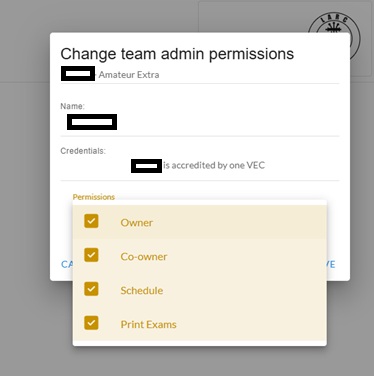
  • Owner — whether this team member also holds Owner status
  • Co-owner — whether this team member is automatically granted Co-owner status on any session they create
  • Schedule — whether this team member is permitted to create/schedule a session
  • Print Exams — whether this team member is permitted to print exams
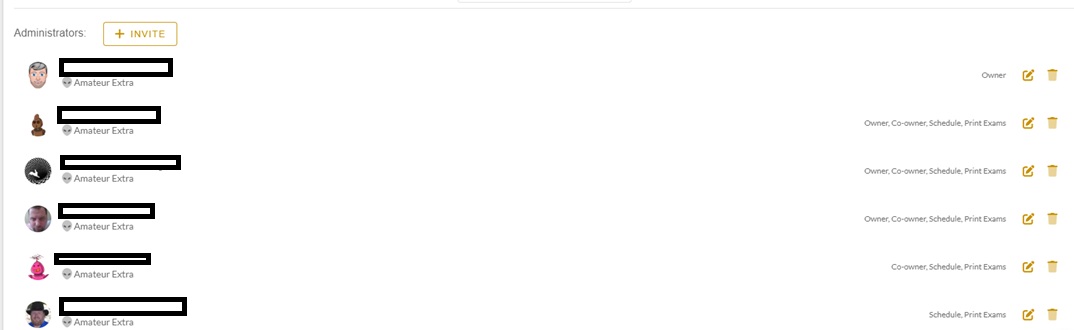
ExamTools Manage Team screen showing team member profiles and permission toggles for Owner status, automatic Co-Owner on session creation, session creation rights, and exam printing rights
Fig. 1 — The Manage Team screen, where the Owner configures other team members’ ExamTools permissions.
Change team admin permissions dialog in ExamTools showing four checked permission toggles: Owner, Co-owner, Schedule, and Print Exams
Fig. 2 — The Change team admin permissions dialog, with the four toggleable permissions: Owner, Co-owner, Schedule, and Print Exams.

Part B — Pre-Session Setup Checklist

Before applicants arrive

Step Action
1 Confirm session is listed in the Laurel VEC portal. This must be done before the session date and before any file upload. If not listed, add it first.
2 Confirm adequate qualified VEs. Minimum three. Verify license class against elements being offered.
3 Owner creates the session in ExamTools. Assign Co-Owner(s), VE Admins, and VEs to their correct access levels before check-in begins.
4 Prepare paper exam packets for applicants who choose paper. Question booklet plus answer sheet.
5 Verify internet connectivity (venue wifi, team hotspot, or phone hotspot). Test applicant devices if team-supplied.
Knowledge Check

Which ExamTools role creates the session and has full management authority over all session details?

Knowledge Check

A VE is assigned VE Admin status in ExamTools. What specific capability does this role add compared to standard VE access?

docs.exam.tools/docs/general/sessionrolespermissions” data-fb-n=”Review Part A. VE Admin editing authority is specific to applicant record management. It does not include session control functions like starting or finalizing. The additional training requirement exists because this role can alter applicant data.”>
Knowledge Check

Before setting up an ExamTools session for the first time, which Laurel VEC requirement must a Team Leader complete?

Knowledge Check

Your team is conducting an ExamTools session at a venue with no wifi. Applicants are bringing their own devices. How can internet access be provided?

Knowledge Check

A newly accredited VE has just been approved by ExamTools. What determines whether their new ExamTools profile shows them matched to the correct team?

References: ExamTools Documentation  •  Laurel VEC P&P

← Lesson 1 Answer all questions to continue


Login with Patreon

Login with Patreon

Search Site

Products

  • Family Emergency Plan and Household Recovery Workbooks - Patreon Family Emergency Plan and Household Recovery Workbooks - Patreon $34.95
  • Bundle - Family Emergency Plan and Household Recovery Workbooks Bundle - Family Emergency Plan and Household Recovery Workbooks $46.95
  • Household Recovery Workbook Household Recovery Workbook $29.95
  • The Continuity Chronicles Seal Decal The Continuity Chronicles Seal Decal $5.00 Original price was: $5.00.$3.00Current price is: $3.00.
  • Family Emergency Plan Workbook - Patreon Family Emergency Plan Workbook - Patreon $19.95
  • Personal Preparedness Assessment Workbook - Patreon Personal Preparedness Assessment Workbook - Patreon $19.95
  • The Next of Kin Workbook - Patreon The Next of Kin Workbook - Patreon $23.95
  • Personal Preparedness Assessment Report Personal Preparedness Assessment Report $179.95
  • Bundle - Family Emergency Plan + Next of Kin Workbooks Bundle - Family Emergency Plan + Next of Kin Workbooks $49.95
  • The Next of Kin Workbook The Next of Kin Workbook $29.95
  • ASAR — 50 Mile Radius ASAR — 50 Mile Radius $139.95
  • ASAR 50-MILE + FEP WORKBOOK ASAR 50-MILE + FEP WORKBOOK $169.95
  • ASAR — 50 Mile Radius - Patreon ASAR — 50 Mile Radius - Patreon $39.95
  • Bundle - The Series Starter (Paperback) Bundle - The Series Starter (Paperback) $29.98
  • The Brush (Paperback) The Brush (Paperback) $15.99
  • The Meadow Protocol (Paperback) The Meadow Protocol (Paperback) $13.99
  • Cards (4x6) - Brevity Cards for OTP Cards (4x6) - Brevity Cards for OTP $24.95
  • Communications Card bundle (13 cards) Communications Card bundle (13 cards) $41.95
  • Personal Preparedness Assessment Workbook Personal Preparedness Assessment Workbook $24.95
  • Family Emergency Plan Workbook Family Emergency Plan Workbook $24.95

Product categories

Cart

©2026 Fortune Favors the Prepared | Built using WordPress and Responsive Blogily theme by Superb